Reopen Nothi Cycle Overview
Main Objective
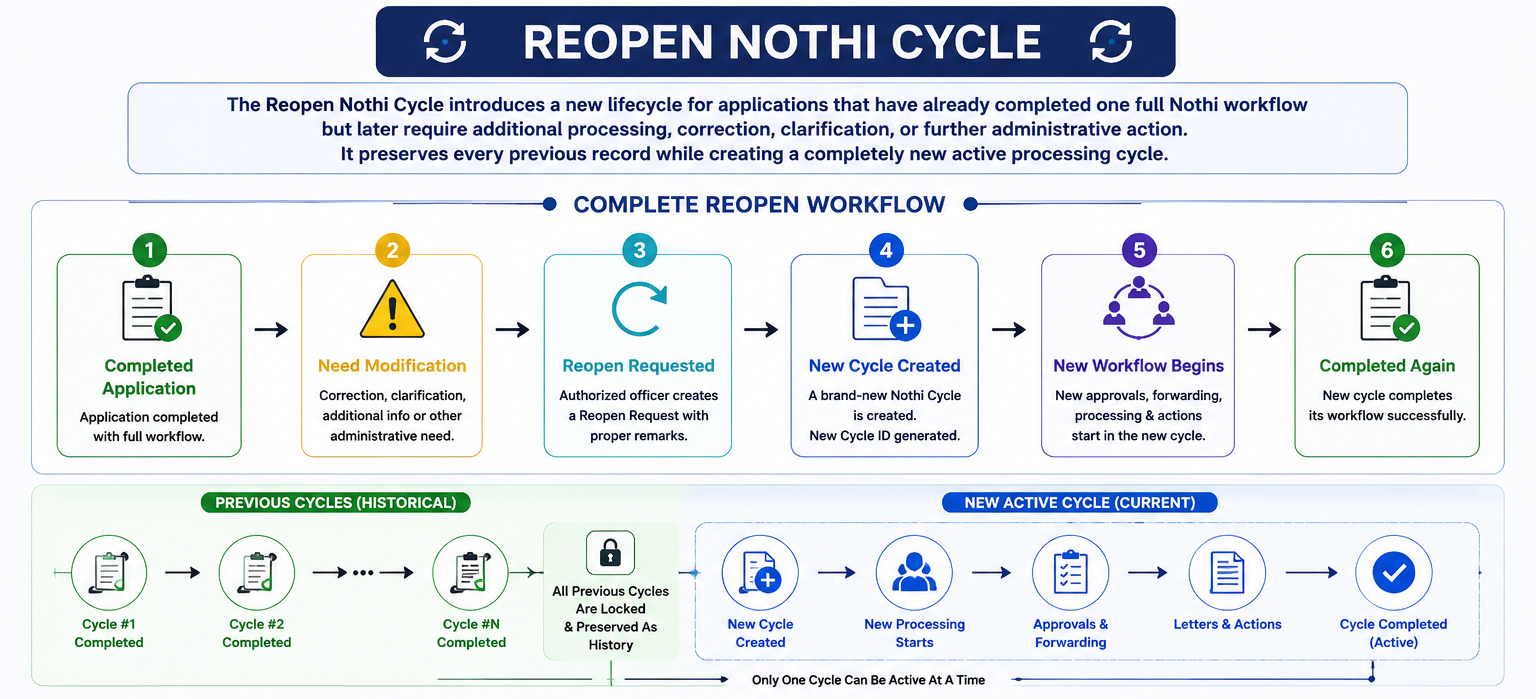
The primary goal of the Reopen System is to allow officers to continue working on an already completed application without losing any previous notes, approvals, forwarding history, letters, or completed workflow.
The primary goal of the Reopen System is to allow officers to continue working on an already completed application without losing any previous notes, approvals, forwarding history, letters, or completed workflow.
Benefits
- No previous data is deleted.
- Unlimited reopen cycles supported.
- Complete audit trail.
- Historical approval preservation.
- Historical letters remain available.
- Only one active cycle exists at a time.
- Future maintenance becomes easier.
- Developer-friendly architecture.
Important
A Reopen Request never edits the previous completed workflow. Instead, it creates an entirely new processing cycle while archiving the previous one as completed history.
A Reopen Request never edits the previous completed workflow. Instead, it creates an entirely new processing cycle while archiving the previous one as completed history.
Why Reopen Nothi Cycle Was Introduced
- Applicant submits new supporting documents after completion.
- Authority requests correction.
- New government instruction received.
- Survey information changes.
- Letter requires modification.
- Previous processing contains incomplete information.
- Additional approval becomes necessary.
- Court or administrative instruction received.
- Re-verification required.
- Administrative decision changes.
Without the Reopen System, officers had to manually modify completed
records, making history difficult to track. The new architecture
solves this problem by preserving every completed cycle.
🔄 Complete Reopen Workflow
✅ Completed Application
➜
Need Modification
➜
Reopen Request
➜
Officer Selection
➜
Add Note
➜
Submit Request
➜
Target Officer Inbox
➜
Accept / Reject
➜
Accepted
➜
Old Cycle Closed
➜
Create New Cycle
➜
Move Application
➜
Agoto Nothi
➜
Processing
➜
Forward
➜
Letter
➜
Nisponno
➜
🎉 Completed Again
Step 1 : Reopen Request
Once an application has been completed, an authorized officer may
determine that additional work is required. Instead of editing the
completed workflow, the officer creates a Reopen Request. This
request starts a completely new Nothi processing cycle while
preserving every previous activity.
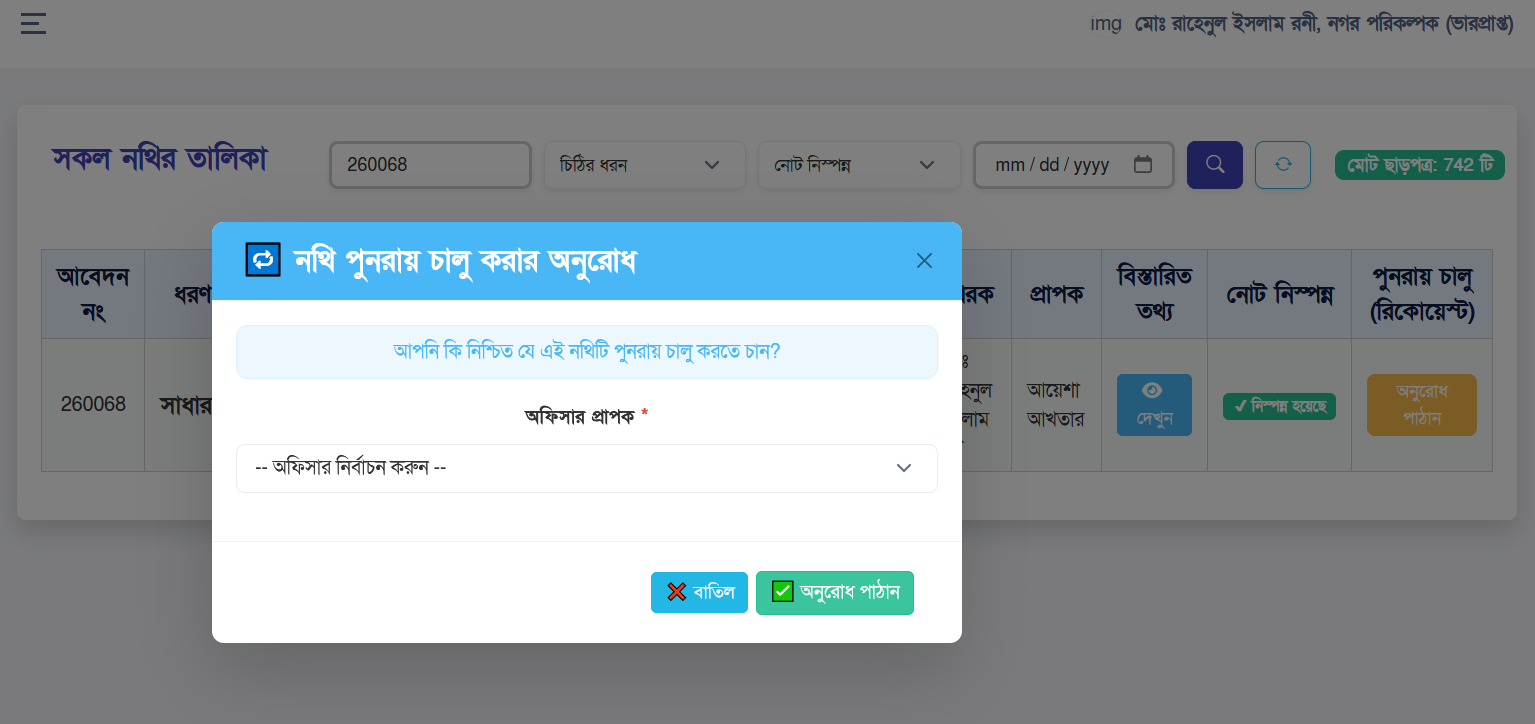
Officer Responsibilities
- Open Completed Application
- Select Request Reopen
- Select Responsible Officer
- Write Official Reopen Note
- Explain why reopening is required
- Submit Request
Business Rule
Every reopen request becomes part of the permanent application history. Nothing is deleted.
Every reopen request becomes part of the permanent application history. Nothing is deleted.
Reopen Request does NOT reopen immediately. The request must first
be accepted by the receiving officer.
🔄 Reopen Request Life Cycle
👤 Officer
➜
📄 Select Application
➜
🔄 Click Reopen
➜
👥 Select Officer
➜
📝 Write Note
➜
📤 Send Request
➜
⏳ Pending Request
➜
✅ Waiting for Acceptance
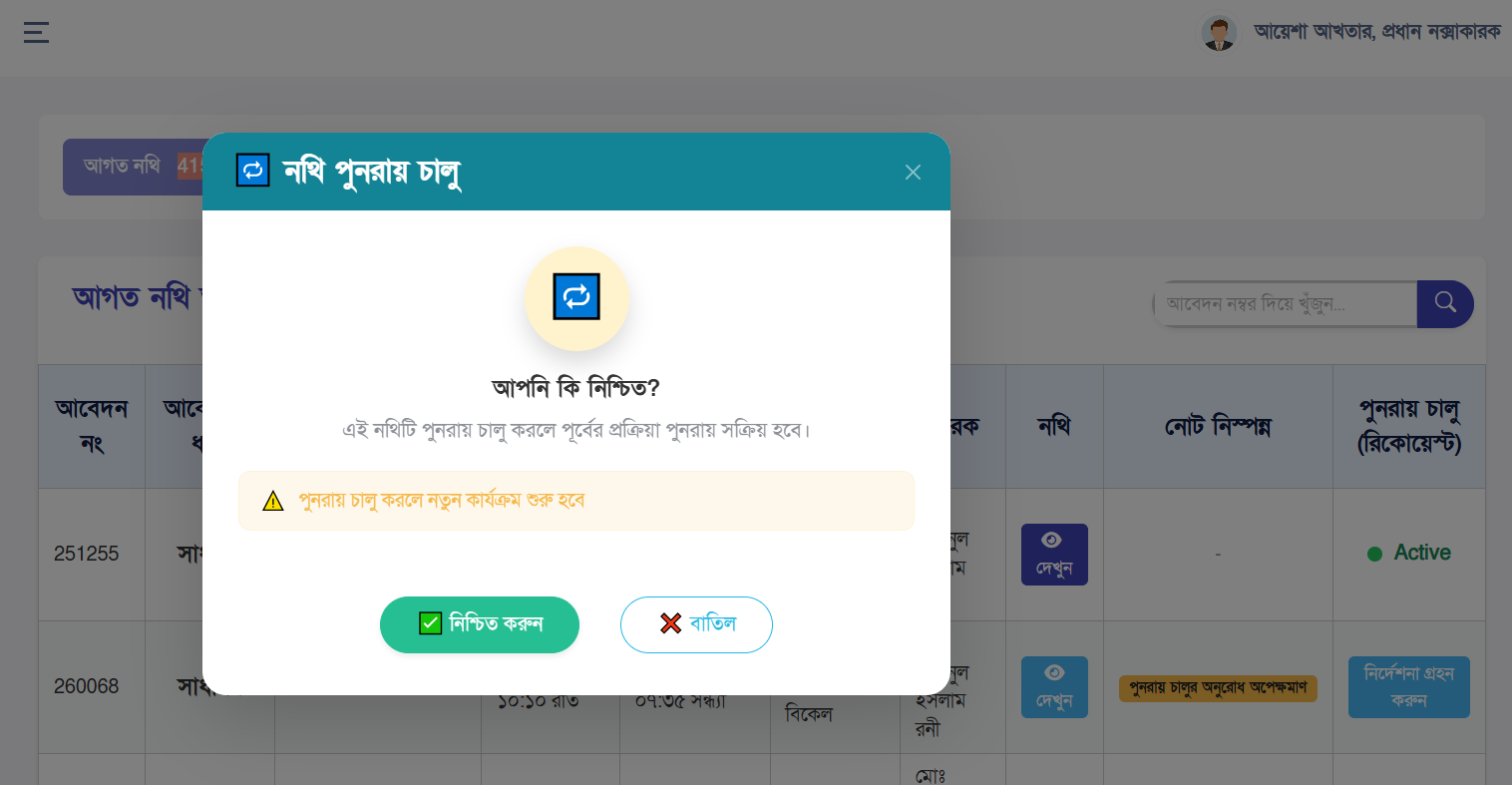
Step 2 : Accept Reopen Request
After receiving the request, the assigned officer reviews the
request, verifies the reason, checks previous history, and decides
whether to accept the request.
System Operations
| Action | Description |
|---|---|
| Validate Request | Ensure request is still pending. |
| Close Previous Cycle | Previous cycle becomes archived. |
| Create New Cycle | Generate next Nothi Cycle. |
| Copy Required Data | Application remains linked. |
| Reset Workflow | Application returns to processing. |
| Activate New Cycle | Only this cycle becomes active. |
✅ Request Acceptance Workflow
⏳ Pending Request
➜
✔ Officer Accept
➜
📦 Archive Previous Cycle
➜
➕ Create New Cycle
➜
👤 Assign Current Officer
➜
📄 Application Returns
➜
📥 Agoto Nothi
➜
🚀 Processing Starts Again
Only ONE cycle remains active after acceptance. Every previous cycle
remains available for history.
Step 3 : Reopen Timeline
Cycle Completed
Original Nothi workflow successfully completed.
Reopen Requested
Head Officer submits reopen request.
Officer Review
Target officer reviews request.
Accepted
New Nothi Cycle generated.
Processing Restarted
Application enters active workflow again.
Developer Notes
- Previous Cycle is never modified.
- New Cycle receives a new ID.
- Old approvals remain unchanged.
- Letters remain preserved.
- Only one cycle is active.
- Sidebar counters always use Active Cycle.
- History page displays all cycles.
- Audit trail remains intact.
Reopen Request Sent
Reopen Request Form
Accept Reopen Request
Reopen Inbox
Step 4 : New Nothi Cycle Creation
Once a Reopen Request has been accepted, the system automatically
creates a brand-new Nothi Cycle. This new cycle becomes the only
active processing cycle while all previous cycles remain archived
for historical reference. No existing data is overwritten.
System Automatically Performs
- Create New Nothi Cycle
- Assign Active Status
- Archive Previous Cycle
- Generate New Cycle Number
- Link Same Application
- Reset Processing Workflow
🔄 Application Cycle Workflow
🔵 Cycle-1
➜
✅ Completed
➜
🔄 Reopen
➜
🆕 Cycle-2 Created
➜
⭐ Current Active Cycle
➜
🚀 Processing Starts Again
Multiple Reopen Cycle Architecture
There is no limitation on the number of reopen cycles. Every
accepted reopen request creates a completely new cycle. The
application always works with the latest active cycle.
Application Cycle History
📄 Application
├──
✅ Cycle 1 (Completed)
├──
✅ Cycle 2 (Completed)
├──
✅ Cycle 3 (Completed)
└──
🟢 Cycle 4 (ACTIVE)
Historical cycles are read-only. Only the active cycle accepts new
processing.
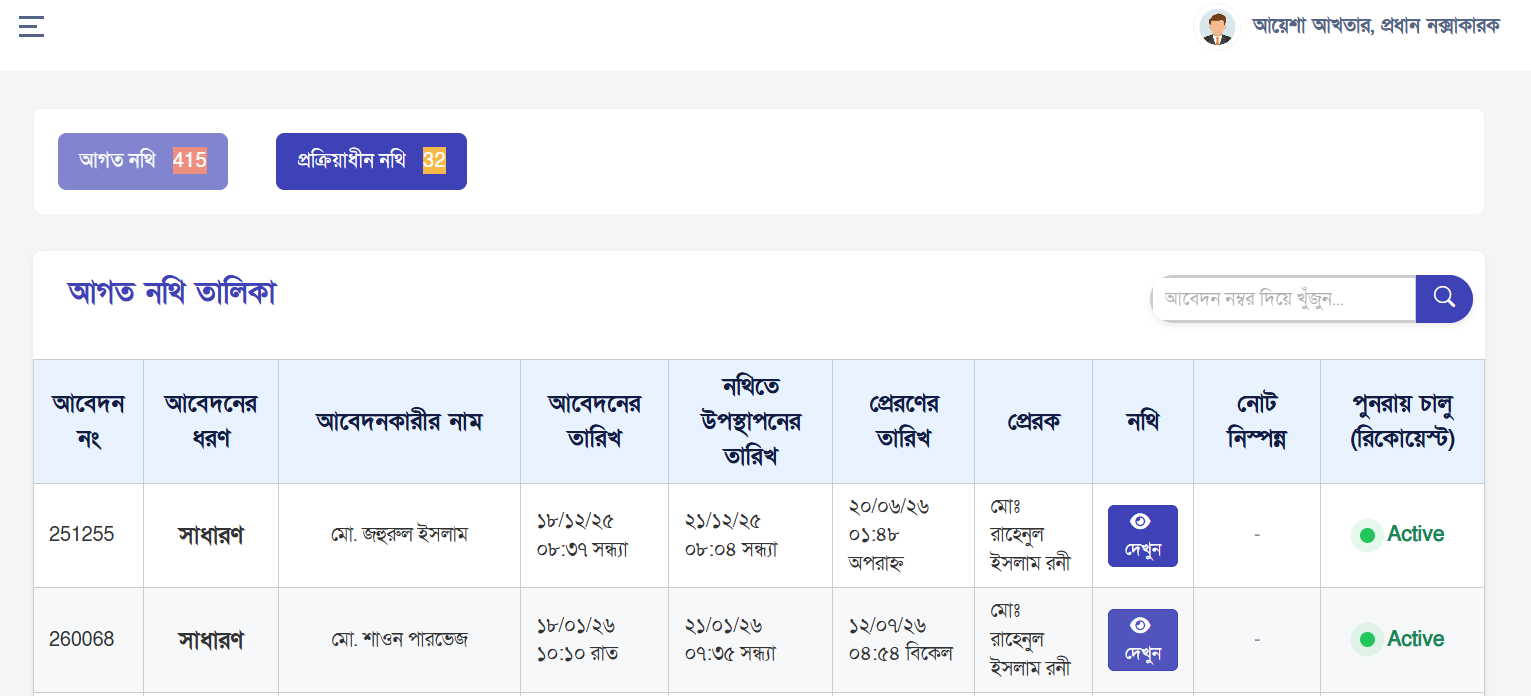
Step 5 : Agoto Nothi (Received Nothi)
Immediately after a new cycle is created, the application appears
inside Agoto Nothi. This indicates that the application has
officially entered the new processing workflow.
- View Application Details
- Review Previous Cycle History
- Review Reopen Note
- Review Previous Letters
- Review Previous Approvals
- Open Current Nothi
- Start Processing
Agoto Nothi represents the first active stage of every new cycle.
Agoto Nothi
Step 6 : Processing Nothi
During this stage officers perform all official work. New notes, new
observations, new recommendations, new letters, and forwarding
decisions are created inside the current cycle. Previous cycle
information remains available only for reference.
| Processing Task | Description |
|---|---|
| Review File | Review application again. |
| Add Note | Create official observations. |
| Attach Documents | Upload additional files. |
| Prepare Letter | Create required draft. |
| Forward | Send to another officer. |
| Approve | Continue workflow. |
📋 Agoto Nothi Processing Workflow
📥 Agoto
➜
📂 Open Nothi
➜
🔍 Review
➜
📝 Write Note
➜
📎 Attach Files
➜
📄 Prepare Letter
➜
📤 Forward
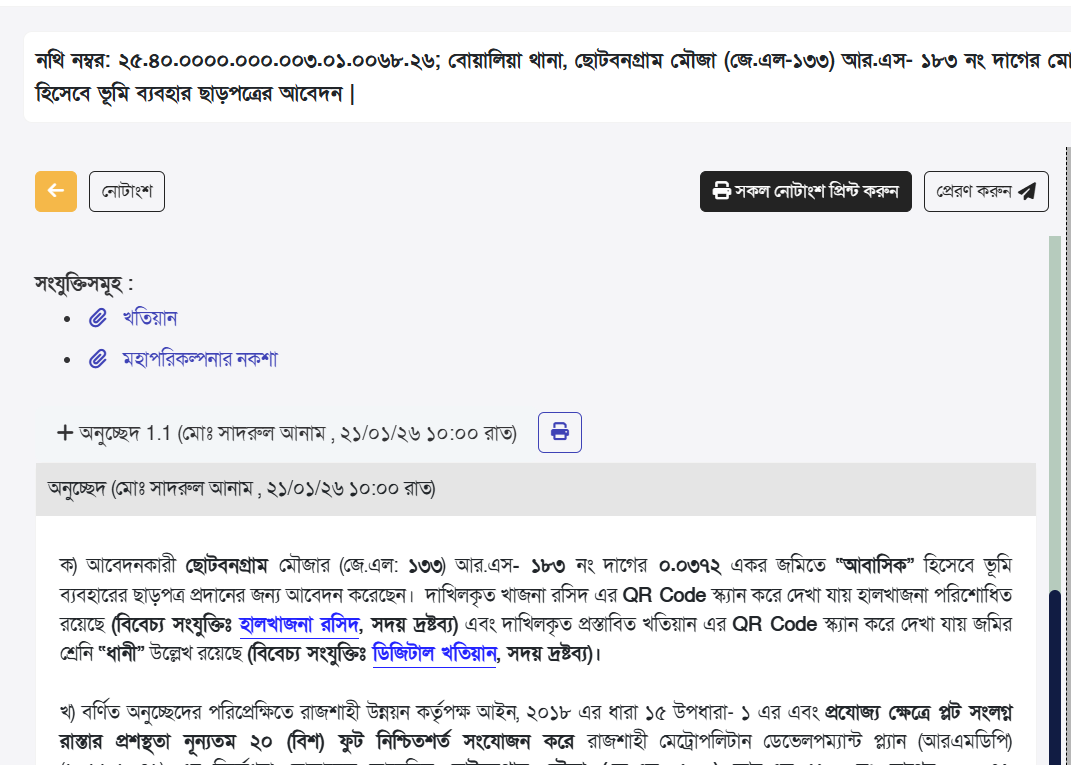
Official Note Management
Every reopen cycle maintains its own independent note history. Notes
written in previous cycles are never edited. Each new cycle builds
its own decision record.
Best Practices
- Write clear observations.
- Reference previous cycle if necessary.
- Avoid duplicate information.
- Maintain chronological order.
- Use official language.
Note Editor
Step 7 : Sending Nothi (Forward Workflow)
After reviewing the application, writing official notes, and
preparing the necessary documents, the officer forwards the active
Nothi to the next responsible officer. Every forwarding action is
permanently recorded inside the current Nothi Cycle.
| Forward Step | Description |
|---|---|
| Select Officer | Choose next responsible officer. |
| Add Forward Note | Explain why the file is being forwarded. |
| Attach Documents | Include supporting files if required. |
| Forward | Move current active cycle to next officer. |
🔄 Application Forwarding Workflow
⚙️ Processing
➜
📝 Prepare Note
➜
👤 Forward Officer
➜
📥 Next Officer Inbox
➜
🚀 Continue Processing
Every forward operation belongs only to the current active cycle.
Step 8 : Letter Management
Letters generated during a reopened workflow remain associated with
their corresponding cycle. Previous letters are never modified or
deleted. Each cycle maintains its own official letter history.
- Create Draft Letter
- Edit Letter
- Clone Existing Letter
- Generate Final Letter
- Print PDF
- Issue Official Copy
- Maintain Letter History
📄 Letter Preparation & Approval Workflow
📝 Draft Letter
➜
🔍 Review
➜
✔️ Approval
➜
📄 Final Letter
➜
🎉 Issued
Previous cycle letters remain preserved as historical documents.
Step 9 : Approval Workflow
Every reopened cycle starts a completely new approval chain.
Previous approvals remain available for history only. The current
workflow always depends on the active cycle approvals.
| Approval Status | Meaning |
|---|---|
| Pending | Waiting for officer action. |
| Presented to Nothi | Officially entered into workflow. |
| Approved | Officer completed approval. |
| Rejected | Workflow stopped. |
Every approval remains permanently linked to its own Nothi Cycle.
Step 10 : Nisponno (Completed Processing)
Once every approval, letter, and forwarding operation has been
completed, the active cycle reaches Nisponno status. The workflow is
considered completed.
✅ Application Completion Workflow
⚙️ Processing
➜
✔️ Approval
➜
📄 Letter
➜
🔍 Final Review
➜
🎯 Nisponno
Nisponno does not delete previous records. The cycle simply becomes
completed.
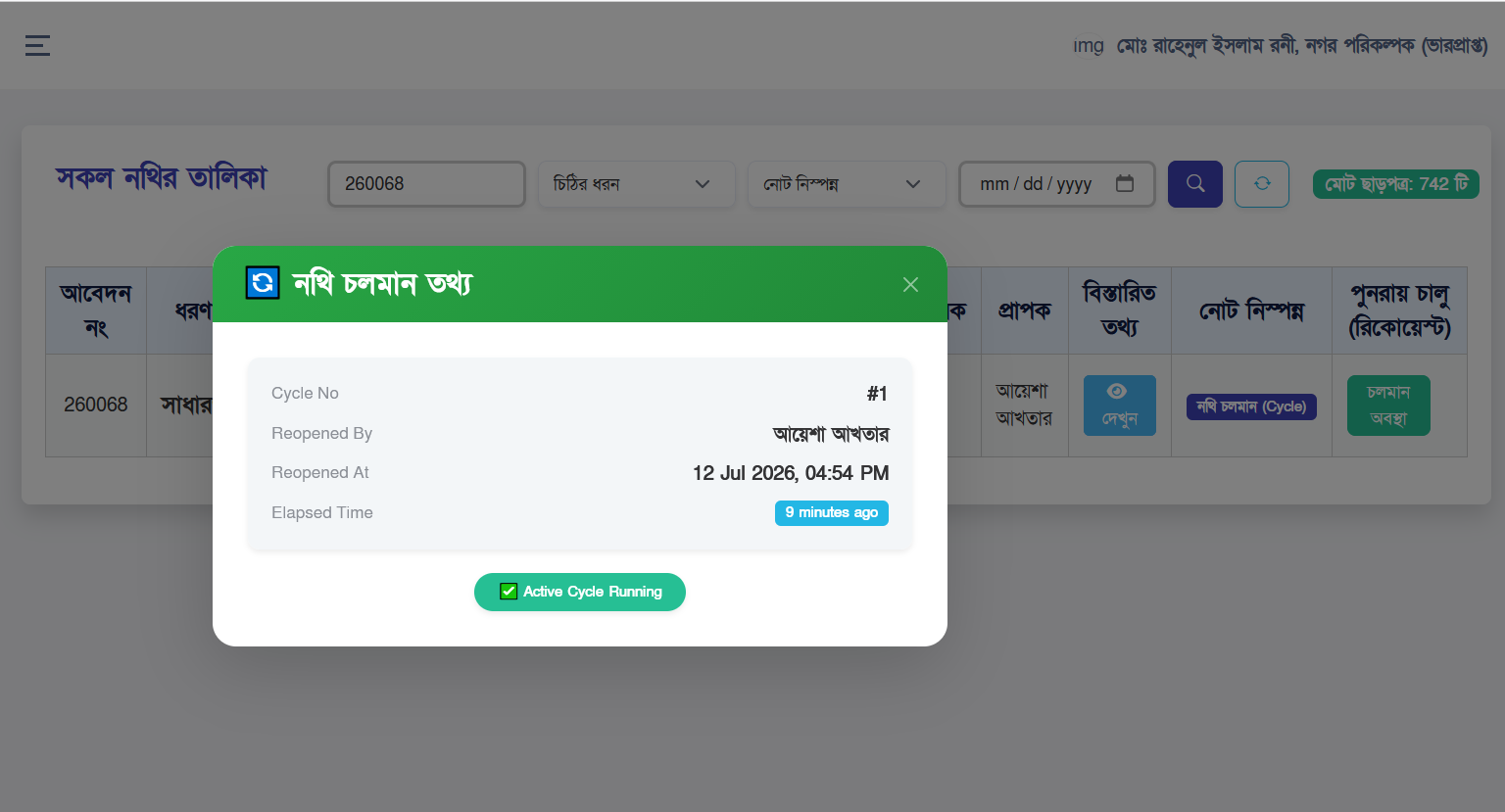
Step 11 : All Nothi
The All Nothi module provides a consolidated view of every cycle
associated with an application. This includes:
- Cycle 1
- Cycle 2
- Cycle 3
- Current Active Cycle
- Completed Cycles
- Approval History
- Letter History
- Forward History
- Reopen History
All Nothi
Sidebar Counter Behaviour
The sidebar always displays counters based on the current active
cycle only. Archived cycles never increase active counters.
| Menu | Counter Logic |
|---|---|
| Incoming Dak | Current active applications only. |
| Agoto Nothi | Current cycle received by officer. |
| Processing | Active processing stage. |
| Sending | Forwarded active cycle. |
| Nisponno | Completed active cycle. |
| All Nothi | Every cycle including history. |
Developer Note
sidebarCounts() should always calculate using only the latest active Nothi Cycle while keeping historical cycles available inside All Nothi.
sidebarCounts() should always calculate using only the latest active Nothi Cycle while keeping historical cycles available inside All Nothi.
Inbox Filter Behaviour
📊 Report & Filter Workflow
✔️ Approval Based
➜
🔄 Reopen Based
➜
📂 Both
➜
🔍 Search
➜
📄 Pagination
- Approval filter displays approval based workflow.
- Reopen filter displays reopened cycles.
- Both combines both workflows.
- Search works on active cycle.
- Pagination preserves filter state.
Database Architecture
The Reopen Nothi Cycle is designed using a multi-cycle architecture.
Each application may contain multiple independent processing cycles
while sharing the same application record. This approach preserves
historical information and simplifies future maintenance.
🗄️ Database Relationship Diagram
📄 noc_applications
│
┌───────▼───────┐
🔄 nothi_cycles
│
✅ noc_approvals
│
🔄 reopen_requests
┌───────▼───────┐
📄 noc_letters
│
📝 nothi_notes
Every table references the current active Nothi Cycle while keeping
historical records unchanged.
Complete Application Life Cycle
Complete Application Lifecycle
📄 Application Submitted
➜
📥 Incoming Dak
➜
📂 Present To Nothi
➜
📋 Agoto Nothi
➜
⚙️ Processing
➜
📤 Forward
➜
✔️ Approval
➜
📄 Letter
➜
🎯 Nisponno
➜
✅ Completed
❓
Need Modification?
➜
YES
➜
🔄 Reopen Request
➜
👍 Accept
➜
🆕 New Nothi Cycle
➜
🔄 Processing Again
➜
🎉 Completed
Developer Workflow
- Never update completed cycles.
- Create a new cycle for every accepted reopen.
- Keep previous approvals untouched.
- Keep previous notes untouched.
- Keep previous letters untouched.
- Calculate counters using only the active cycle.
- History pages should display all cycles.
- Queries should always filter using current cycle where applicable.
Business Rules
| Rule | Description |
|---|---|
| Single Active Cycle | Only one cycle can remain active. |
| Unlimited Reopen | No restriction on number of reopen cycles. |
| History | Previous workflow remains available. |
| Approval | Approval belongs to individual cycle. |
| Letters | Letters belong to their respective cycle. |
| Notes | Notes never move between cycles. |
Cycle History Example
Application Multi-Cycle History
📄 Application
✅ Cycle 1
✔️ Approved
📄 Letter Issued
🎉 Completed
📄 Letter Issued
🎉 Completed
🔄 Cycle 2
🔓 Reopened
⚙️ Processing
📄 Letter
✅ Completed
⚙️ Processing
📄 Letter
✅ Completed
🟢 Cycle 3
🚀 ACTIVE
Best Practices For Officers
- Always review previous cycle before processing.
- Use meaningful reopen notes.
- Never reopen without valid reason.
- Verify supporting documents.
- Keep notes professional.
- Review letter before issue.
- Verify approvals.
- Maintain complete workflow integrity.
Best Practices For Developers
- Always use transactions.
- Keep history immutable.
- Never hard delete workflow records.
- Maintain audit trail.
- Avoid duplicate active cycles.
- Always check current cycle before querying.
- Reuse business logic where possible.
- Keep controller methods modular.
Frequently Asked Questions (FAQ)
Q. Can a completed cycle be edited?
Q. Can multiple reopen cycles exist?
Q. Which cycle is used for processing?
Q. Are previous approvals removed?
Q. Are previous letters deleted?
No. Completed cycles remain read-only.
Q. Can multiple reopen cycles exist?
Yes. Unlimited reopen cycles are supported.
Q. Which cycle is used for processing?
The latest active cycle.
Q. Are previous approvals removed?
No. They remain permanently available.
Q. Are previous letters deleted?
No. Letters remain preserved for audit purposes.
Future Enhancements
- Digital Signature Integration
- Automatic SMS Notification
- Email Notification
- Officer Dashboard Analytics
- Timeline Visualization
- Cycle Comparison View
- Workflow Statistics
- Approval Performance Report
- Cycle Audit Report
- PDF Workflow Export
Final Summary
The Reopen Nothi Cycle System extends the standard RDA Officer
Workflow by introducing a robust multi-cycle processing mechanism.
Every completed application can be reopened through a structured
request and approval process, creating a new independent workflow
cycle without altering historical records. This design ensures
complete transparency, accountability, auditability, and
maintainability while supporting unlimited reopen operations.
Historical approvals, notes, letters, and forwarding actions remain
permanently preserved, allowing officers and developers to trace the
complete lifecycle of every application. By separating historical
cycles from the active processing cycle, the system provides a
scalable architecture that simplifies maintenance, enhances
traceability, and supports future expansion without compromising
data integrity.
Key Takeaways
- Previous cycles are never modified.
- Every reopen creates a new cycle.
- Only one active cycle exists.
- All approvals remain traceable.
- All letters remain preserved.
- Sidebar counters always use the active cycle.
- Complete history is available for auditing.
- Unlimited reopen workflow is supported.