Admin Panel Workflow Overview
The Admin Panel is the central control point of the RDA Software system. It provides
administrators with centralized access to system configuration, role and
permission management, user and officer management, organizational
structure, application monitoring, and activity reporting.
At a Glance:
- Role Management controls roles, permissions, and access levels.
- User Management manages registered applicants and their account information.
- Department Management maintains the organizational structure and departmental workflow.
- Officer Management manages officers and their organizational assignments.
- Application Oversight supports monitoring and control of application-related activities.
- Planning, Mouza, Payment, and System Configuration support the operational and regulatory requirements.
- Applicant and Officer Activity Reports provide activity monitoring, auditing, and administrative visibility.
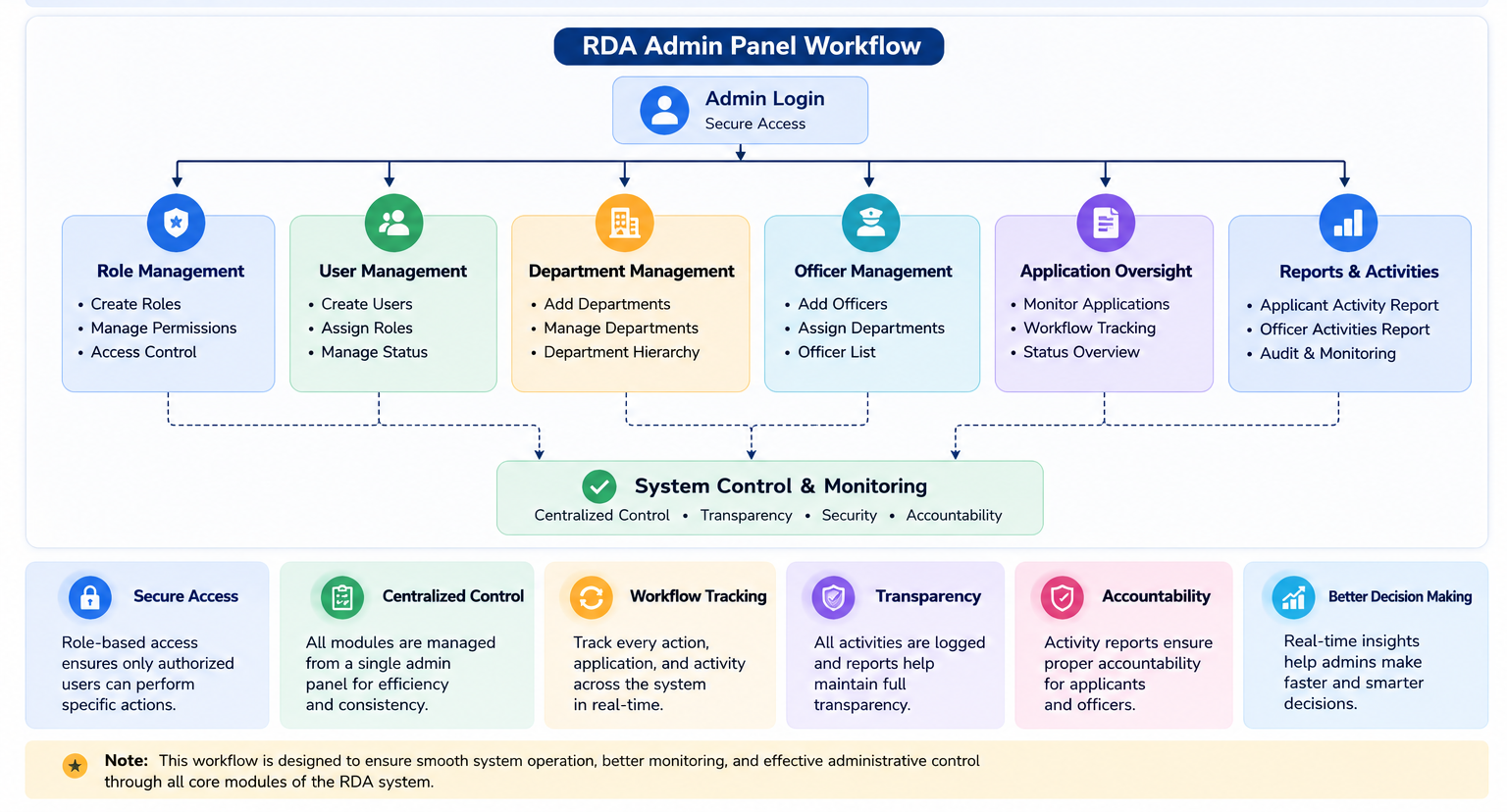
ℹ️ The Admin Panel brings all major administrative functions together in a
centralized environment. Role-based access, organizational management,
application oversight, activity monitoring, and reporting work together to
ensure secure, transparent, and accountable system operations.
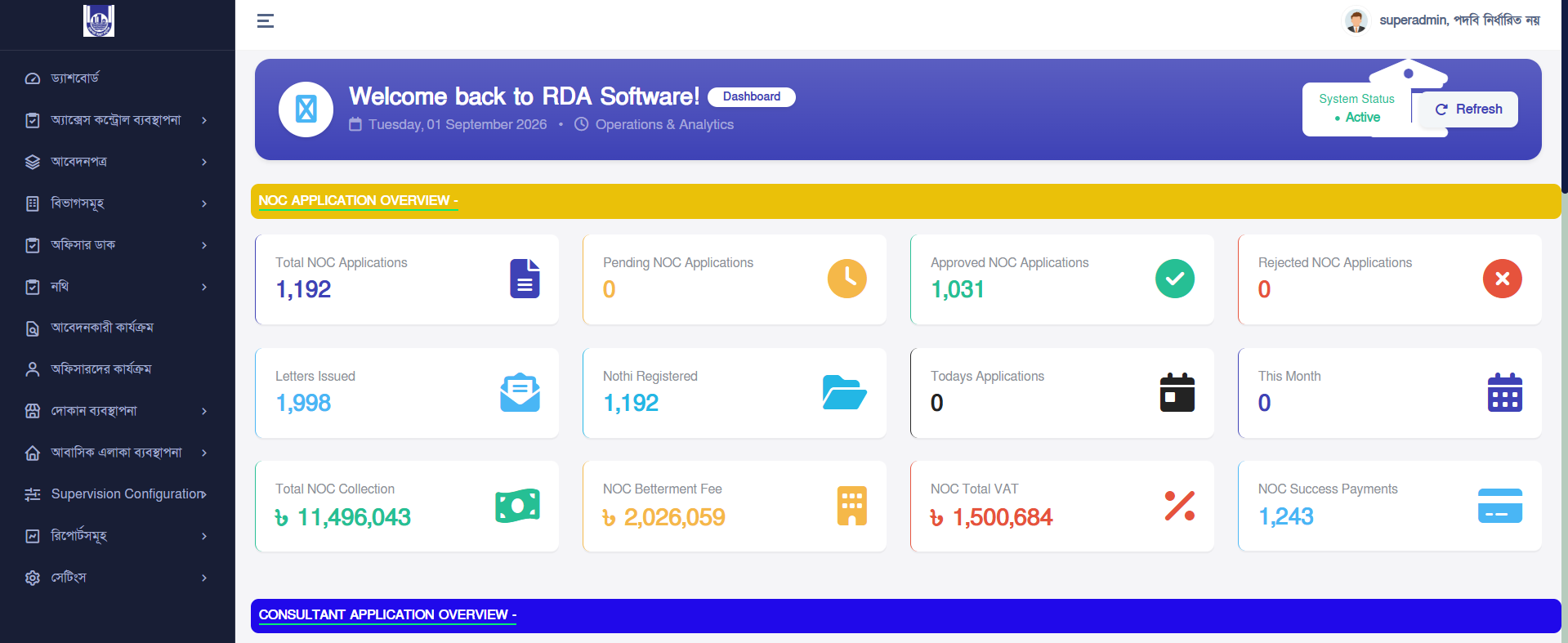
Admin Panel Dashboard
This module ensures secure access control, structured workflow
management, and full administrative control over the entire system
lifecycle in this software.
⚠️ Access is strictly restricted to authorized administrators only.
All activities are logged for security auditing.
Admin panel dashboard
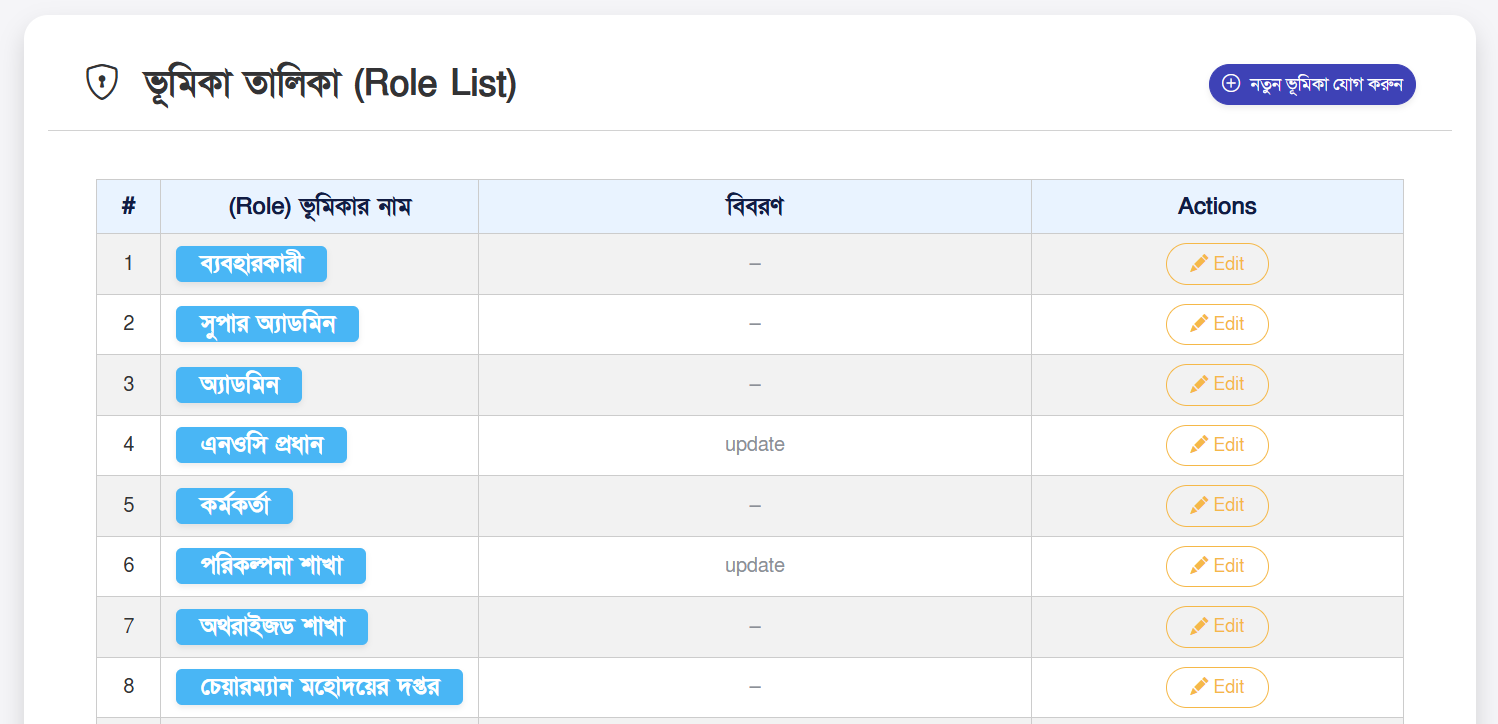
Role Management System
Role management defines the permission structure of the system. Each
role acts as a security layer controlling what a user can access and
perform.
Core Features:
- Create and manage system roles (Admin, Officer, Reviewer, etc.)
- Assign granular permissions (view, create, update, delete)
- Control module-level access security
- Maintain role hierarchy for workflow control
Role Management Interface
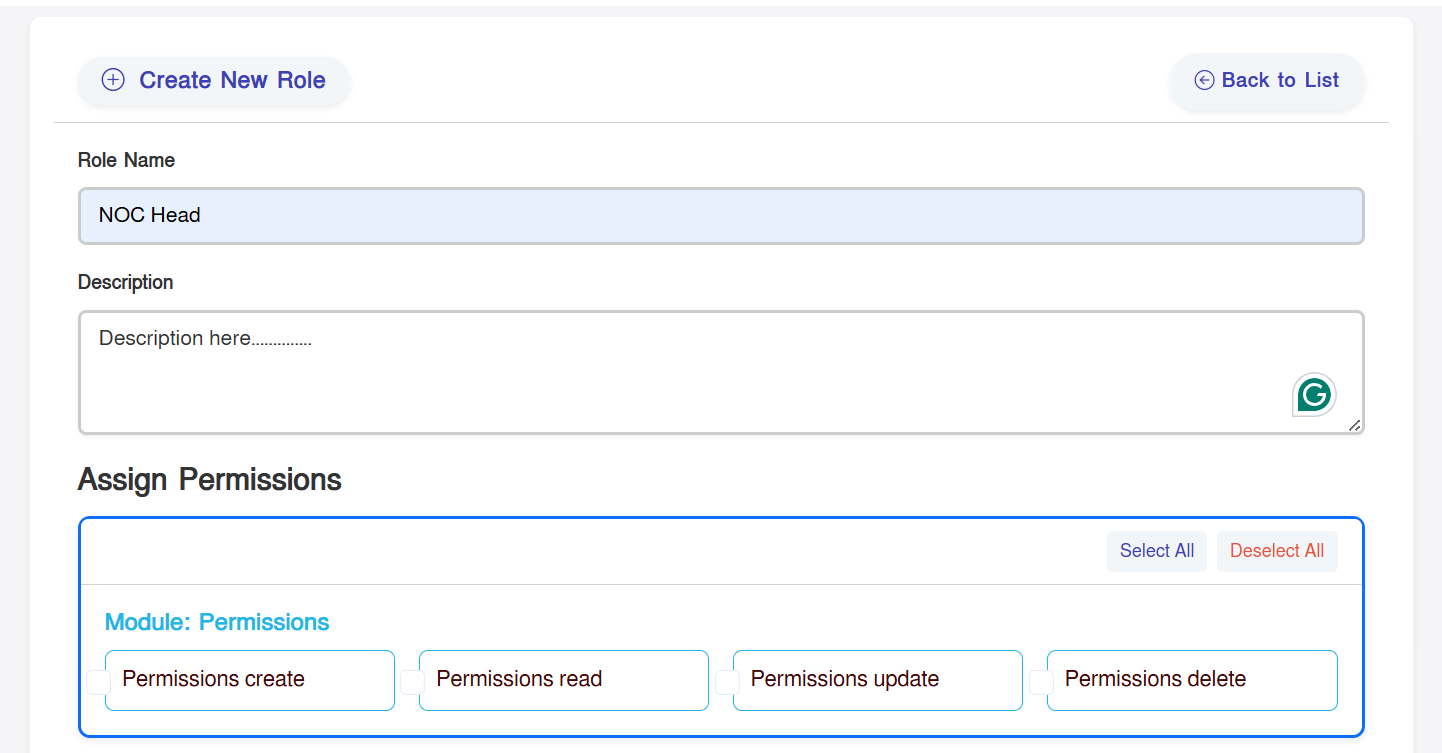
Create New Role
This module allows administrators to define new roles for different
operational needs in the system.
Workflow Steps:
- Open "Add New Role" form
- Provide a unique role name
- Select required permissions from modules
- Submit to activate role in system
Role Creation Form
Officer Management System
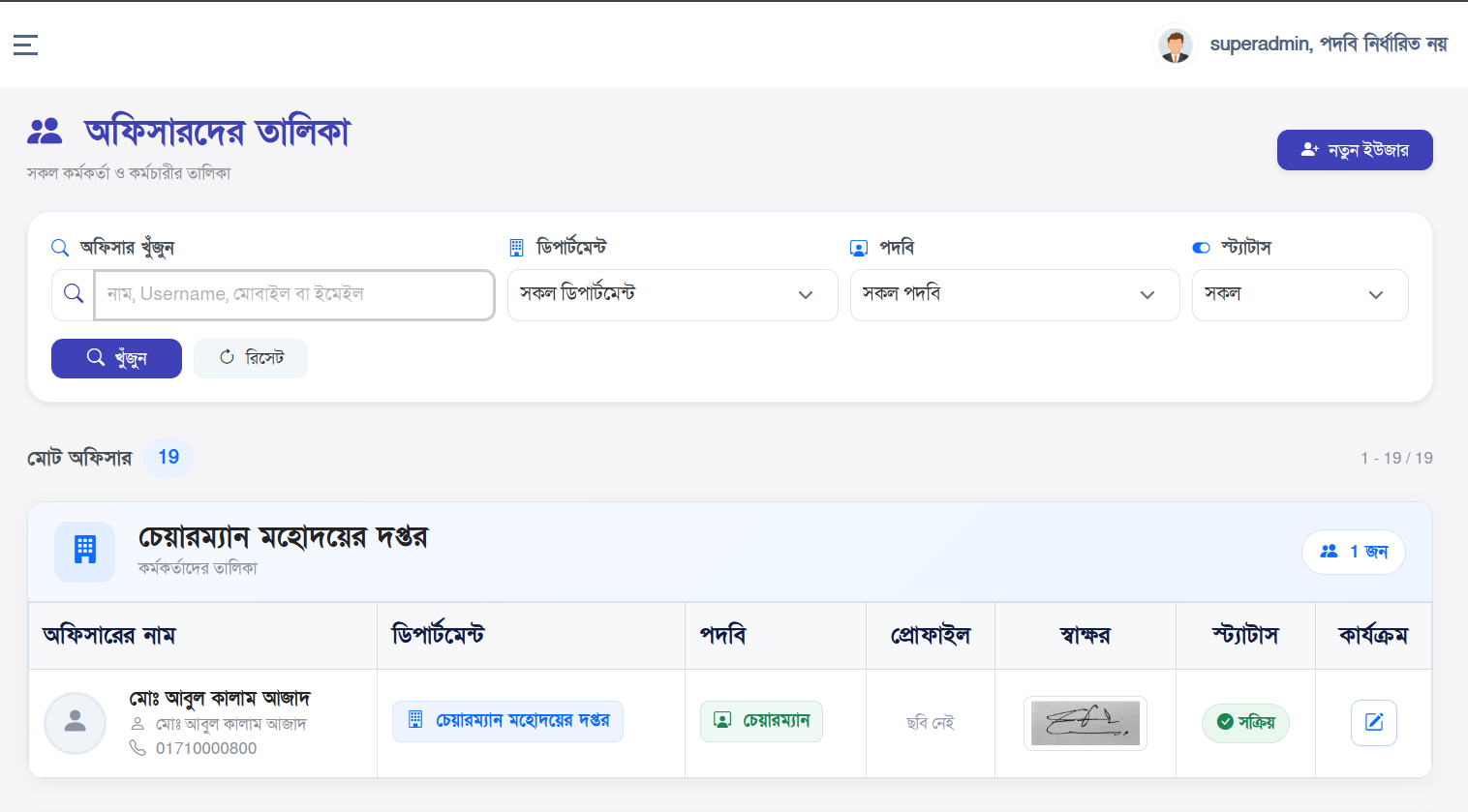
Officer management handles government officials and system operators
responsible for processing applications.
Capabilities:
- Maintain complete officer database
- Assign roles and departments
- Search, filter, and track officers
- Update official profiles and statuses
Officer List View
Officer Registration
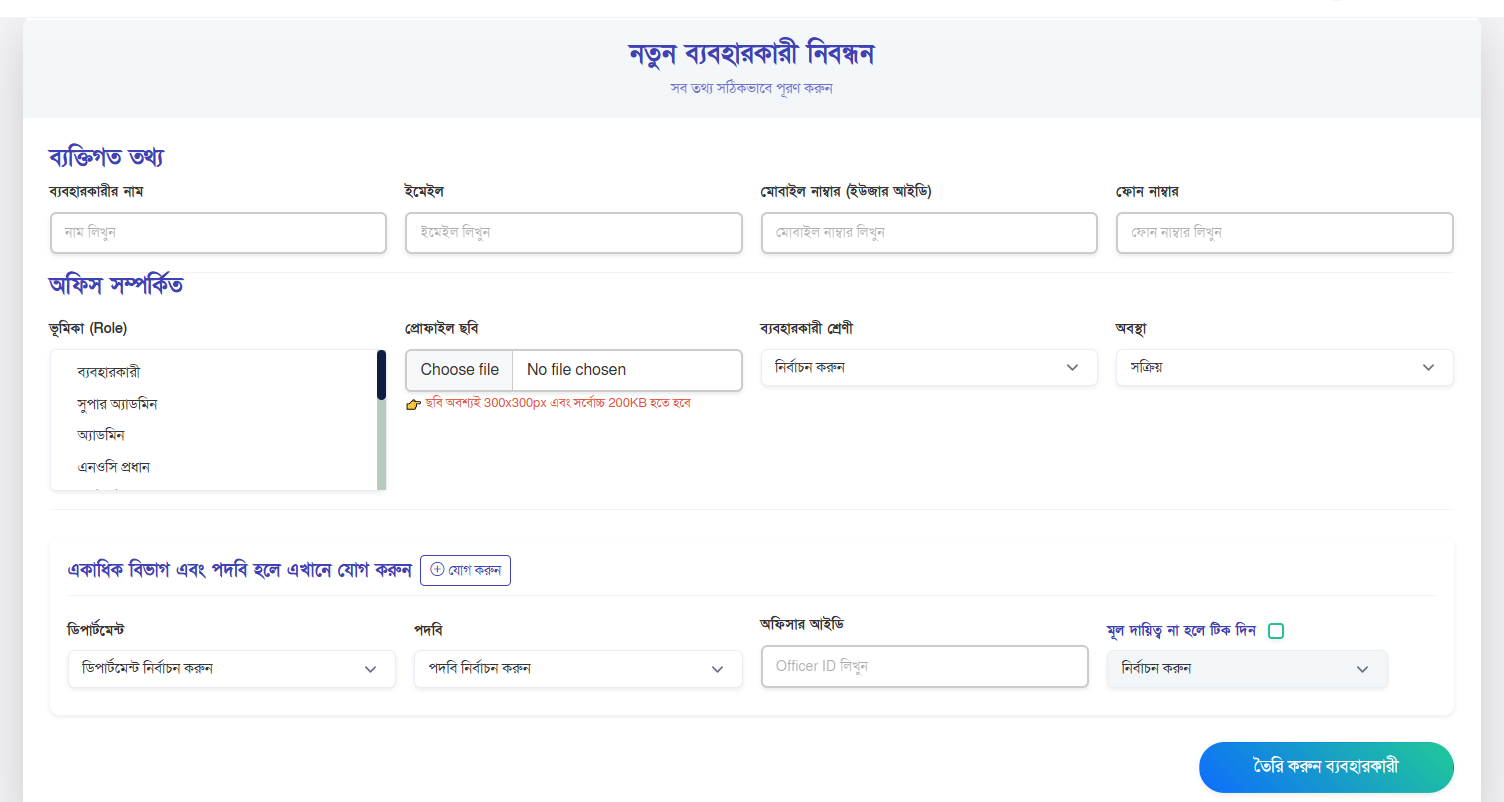
New officers are registered into the system with proper
organizational mapping.
Registration Process:
- Open "Add Officer" panel
- Enter personal & official details
- Select department and role mapping
- Save to activate officer account
Officer Creation Form
User Management System
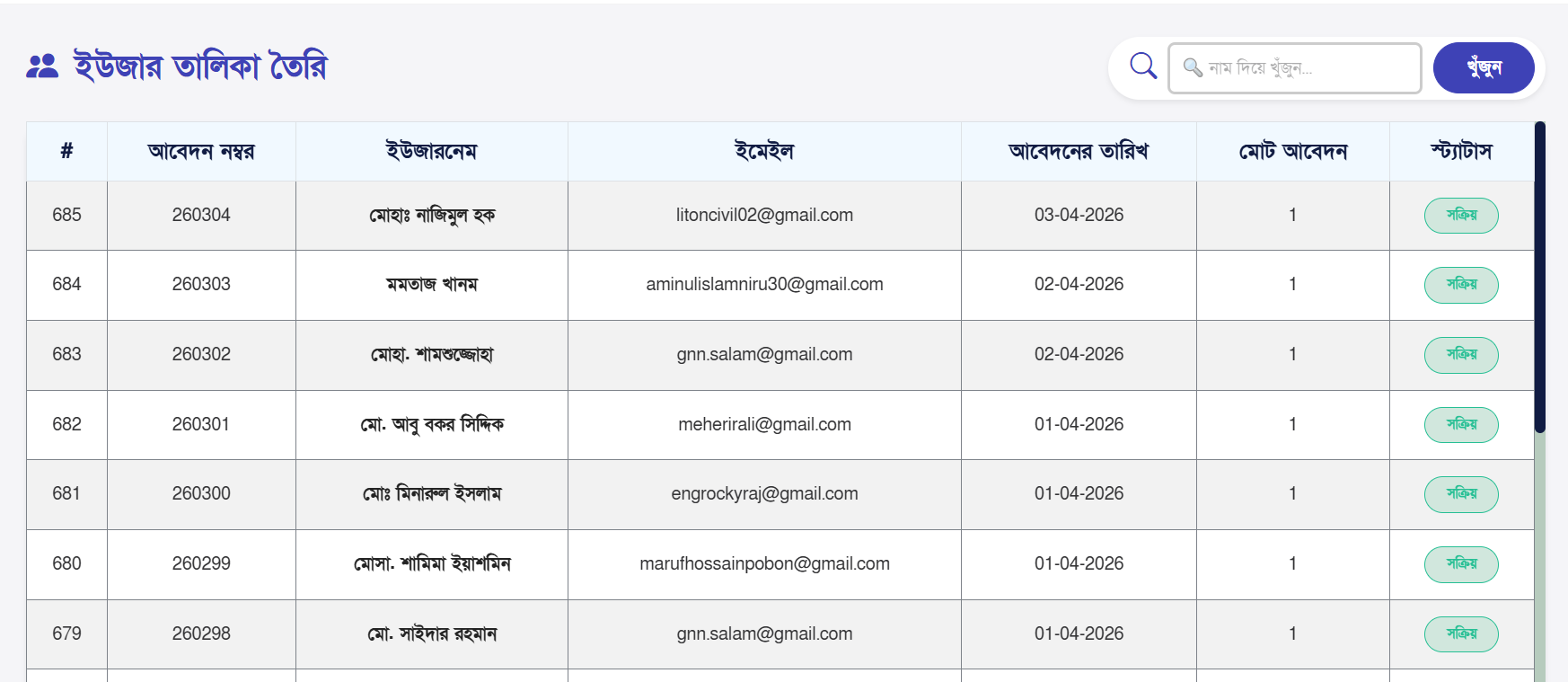
This section manages all external users who submit applications to
the system.
- Track registered applicants
- Monitor application history
- Manage account status (active/suspended)
- Review system usage activity
User Dashboard
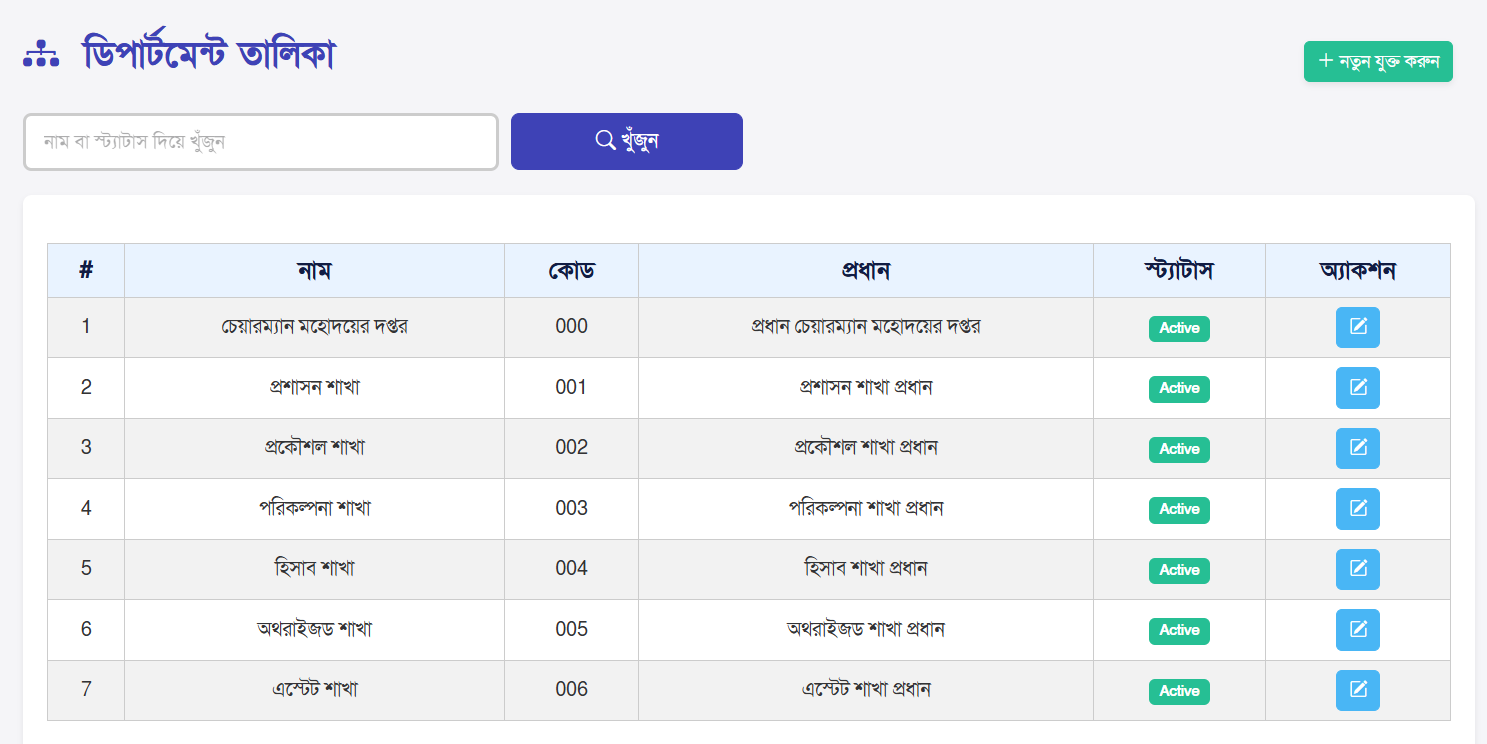
Department Management
Departments define organizational structure and workflow routing
inside the system.
- Create and manage departments
- Assign officers to departments
- Control workflow distribution
Department List
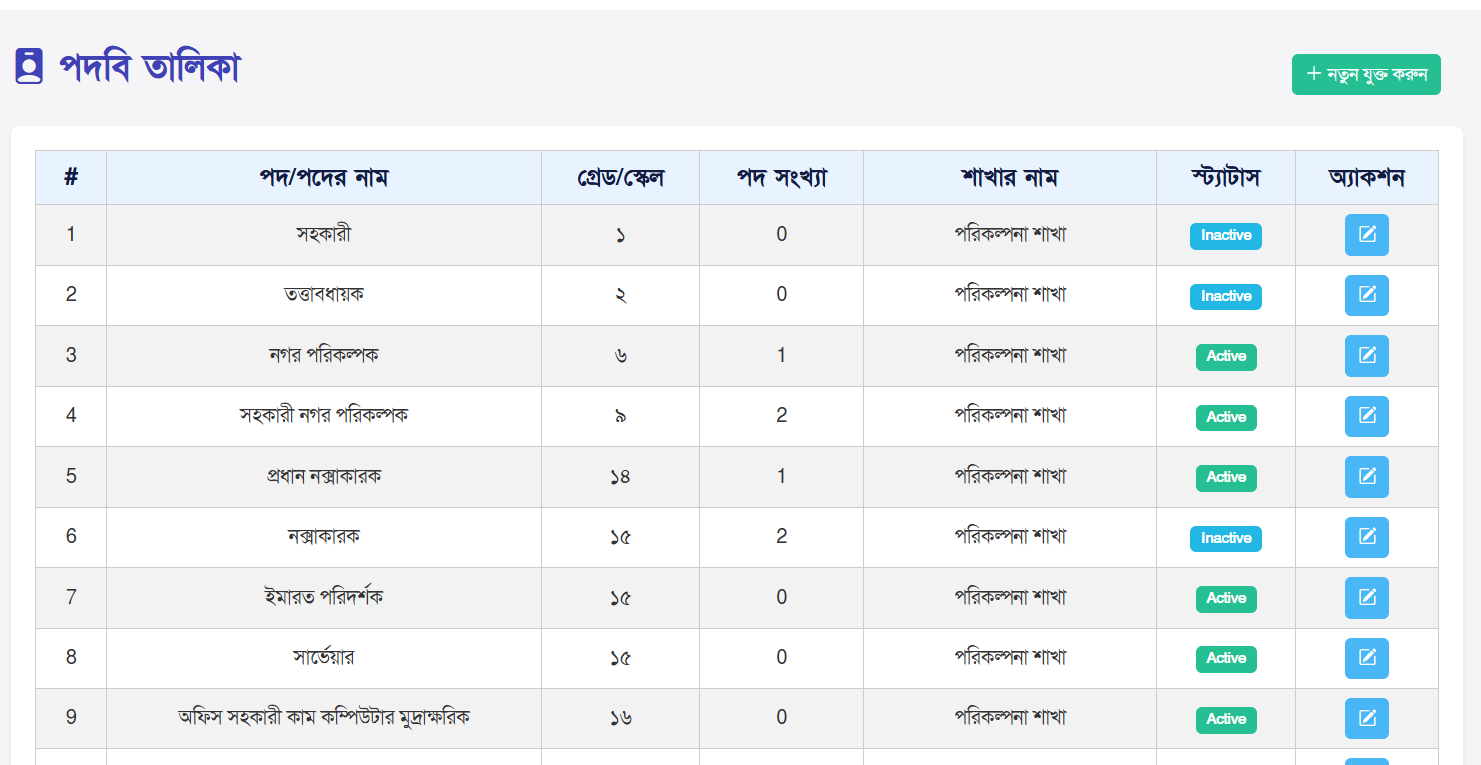
Designation Management
Designations represent official positions within the organization
structure.
- Maintain designation hierarchy
- Assign designation to officers
- Control reporting structure
Designation List
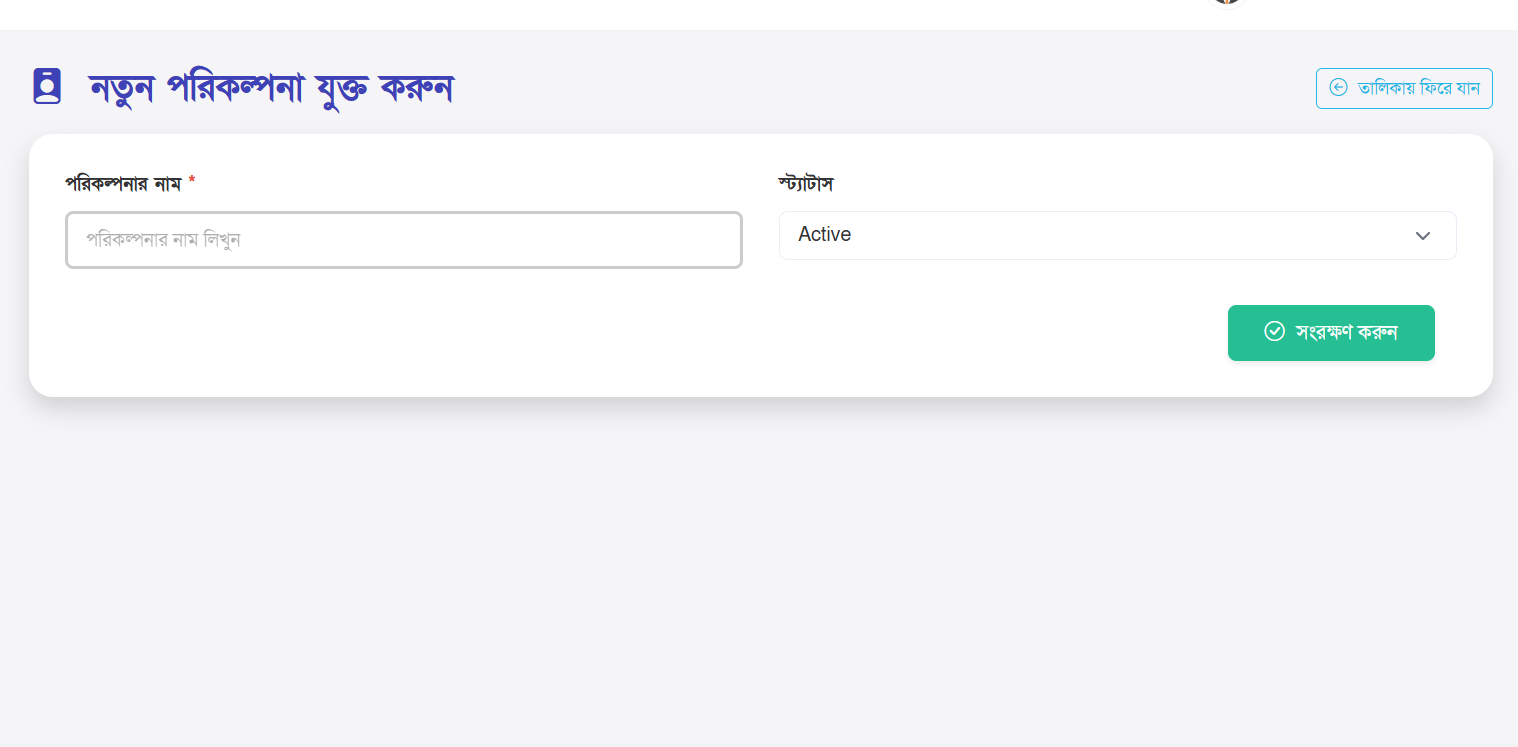
Planning Management
This module manages urban development and land-use planning data for
regulatory control.
- Store planning records
- Manage development zones
- Maintain structured land-use data
Planning Module
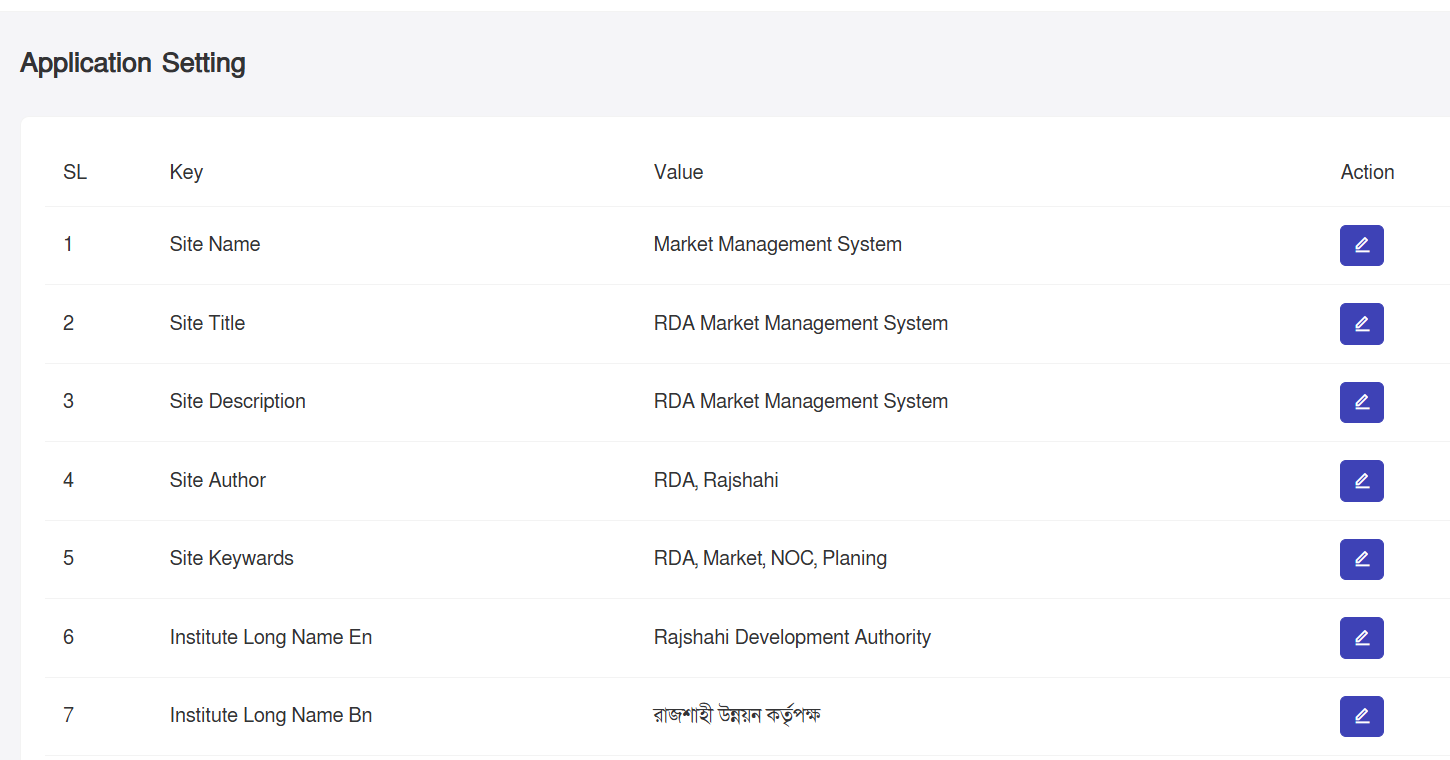
System Configuration
Application settings control system-wide configurations such as
features, rules, and behavior.
- Add configuration key-value pairs
- Enable or disable system features
- Manage global system behavior
Settings Panel
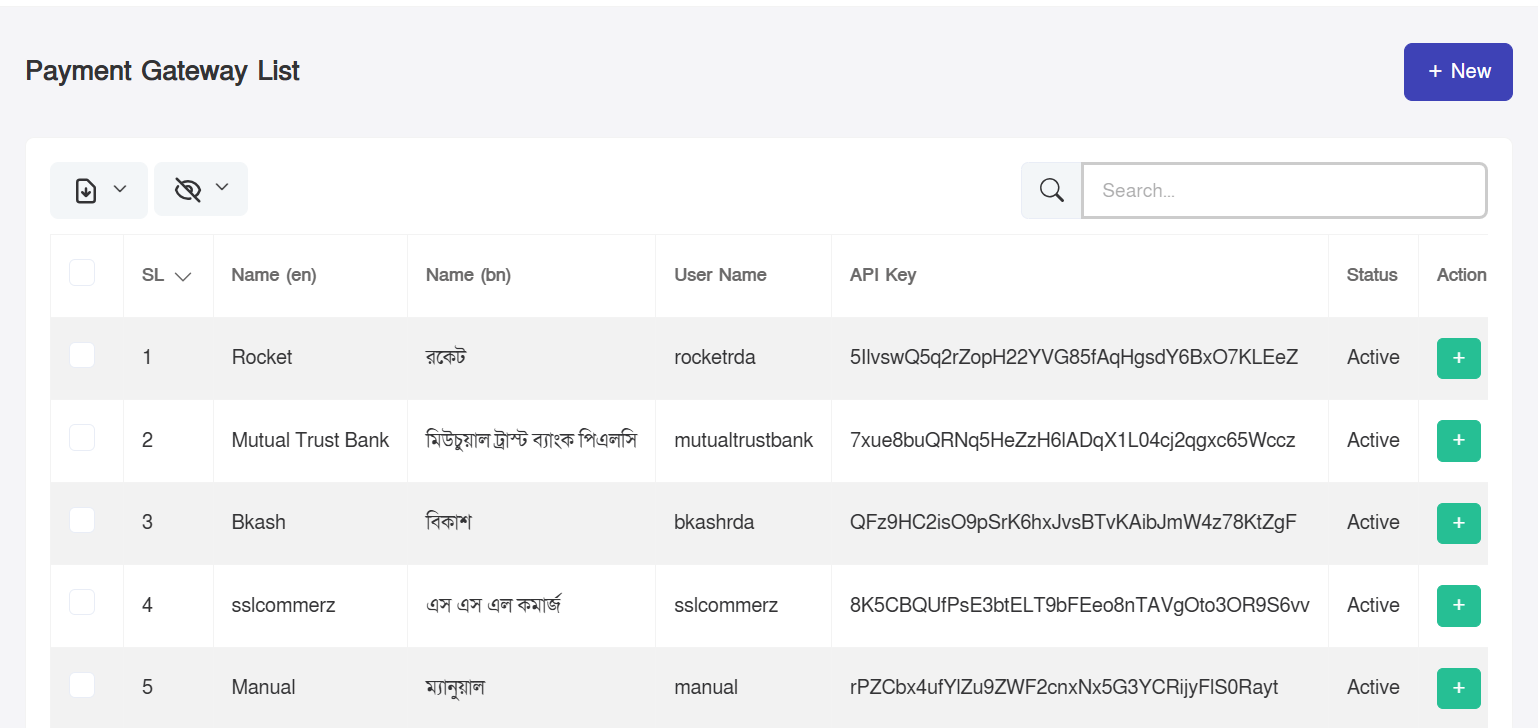
Payment Gateway System
Handles all online payment integrations for application fees and
service charges.
- Configure payment gateways
- Manage transaction settings
- Enable/disable payment providers
Payment Gateway List
Mouza Management System
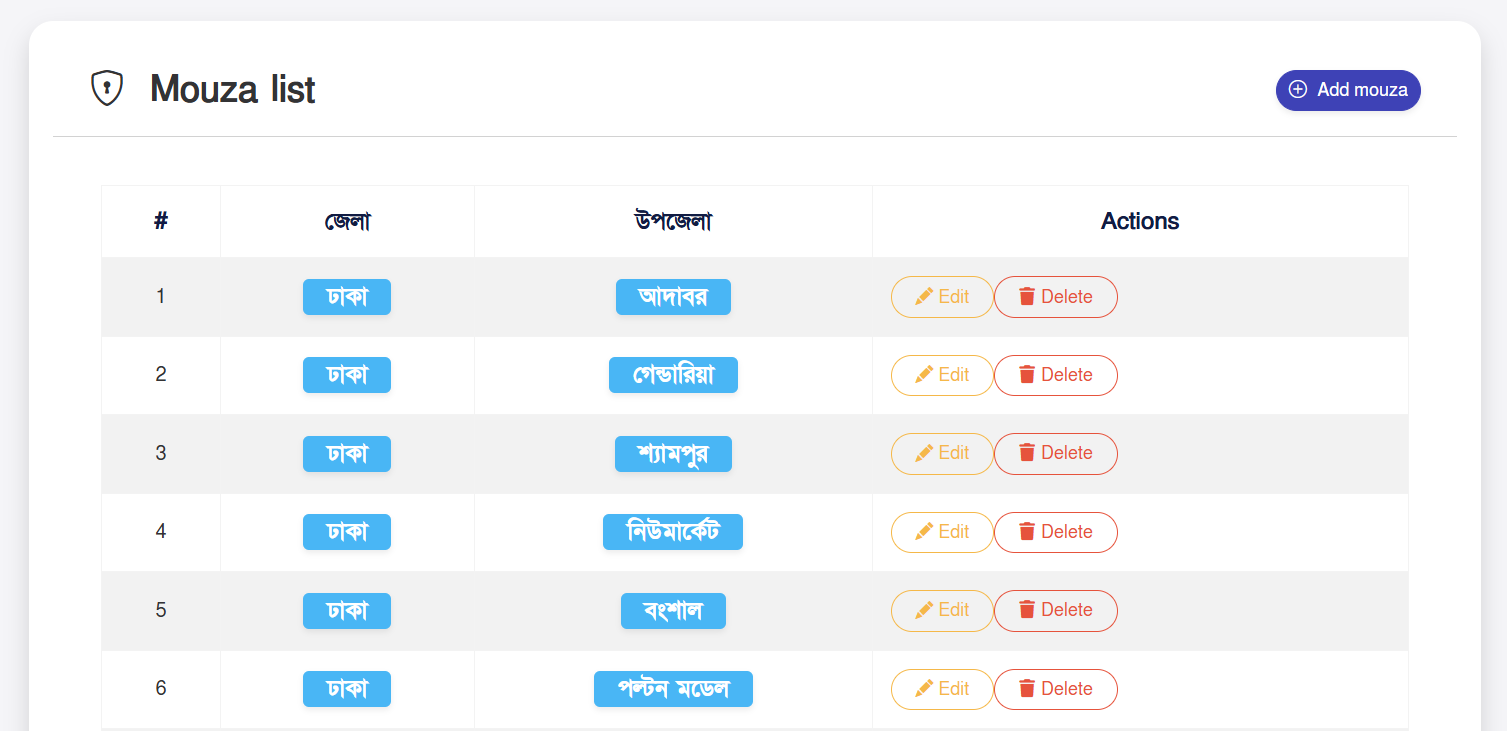
Mouza is a land administration unit used for mapping and planning
control.
- Create land records
- Maintain geographic data structure
- Support planning and revenue systems
Mouza List
Applicant Activity Report
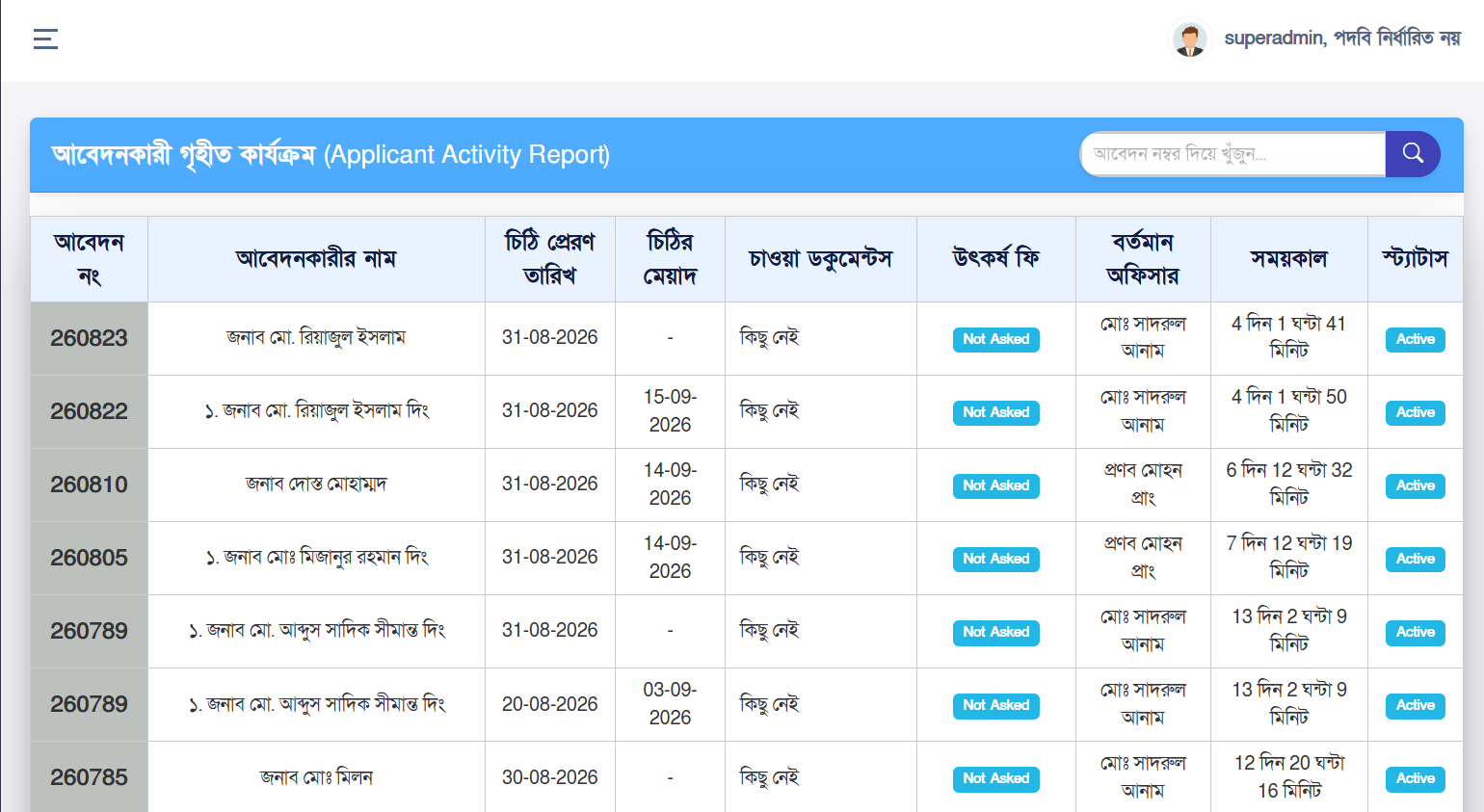
The Applicant Activity Report module allows administrators to monitor and
review various activities performed by registered applicants within the
system. It provides a structured record of when and what type of activities
an applicant has performed.
This module is primarily used to monitor applicant activities, application-related
changes, and other important user activities. It helps ensure transparency,
accountability, and effective administrative monitoring throughout the system.
Key Features:
- Monitor a complete record of applicant activities
- Review activities based on activity type and time
- Identify important activities performed by applicants
- Track application-related activity history
- Use activity records for administrative verification and auditing
- Ensure transparency and accountability in system usage
Important Information Displayed in the Report:
- Applicant Name: Name of the applicant who performed the activity
- Mobile Number: Registered contact number of the applicant
- Activity: Type of activity performed by the applicant
- Application Information: Identification or reference information of the associated application
- Date and Time: Date and time when the activity was performed
- Activity Details: Additional information related to the performed activity
How to Use:
- Open the Applicant Activity Report module from the Admin Panel
- Review the list of activities performed by applicants
- Identify a specific applicant or activity as required
- Verify the activity date, time, and associated information
- Review the details of a specific activity when necessary
ℹ️ The Applicant Activity Report provides administrators with an effective
way to monitor important applicant activities. It supports administrative
verification, activity tracking, transparency, and system auditing.
Applicant Activity Report
Officer Activities Report
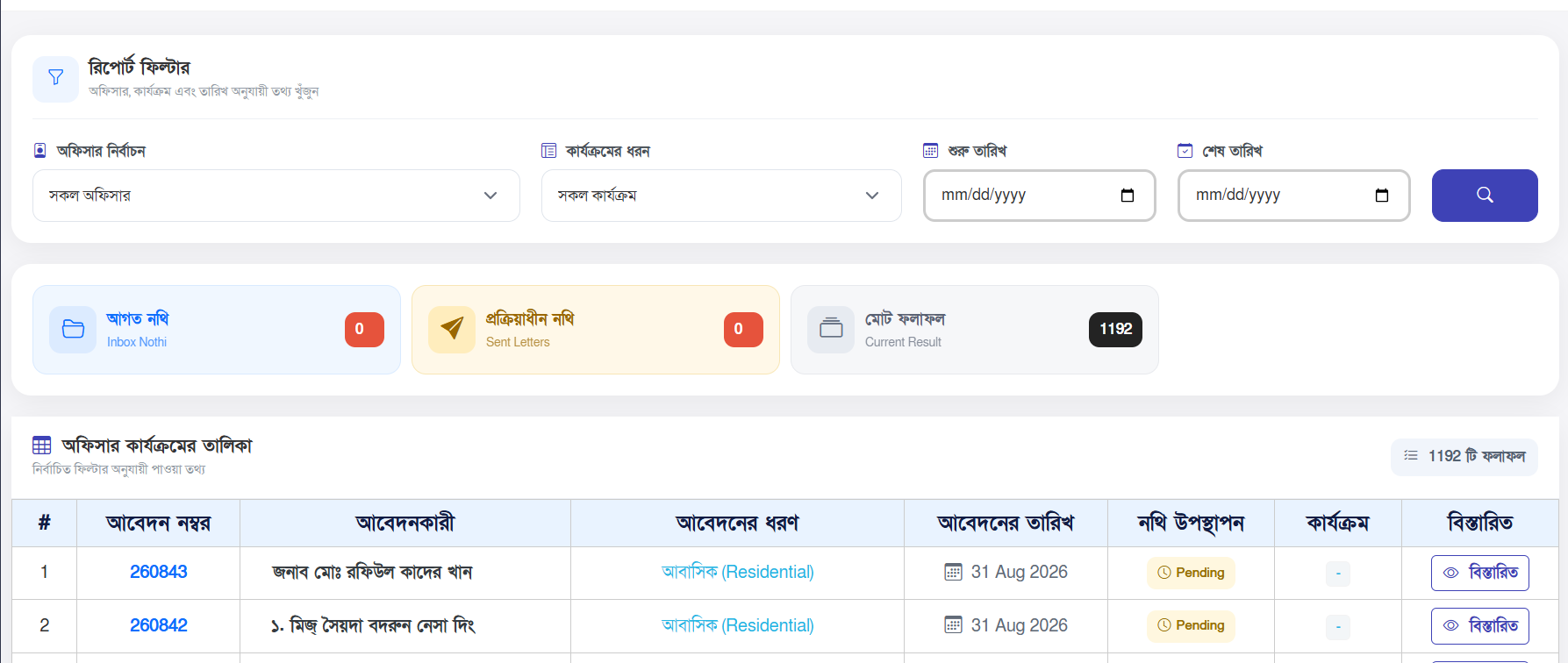
The Officer Activities Report module allows administrators to monitor and
review activities performed by officers within the system. It provides a
centralized view of officer activities related to application processing,
document handling, workflow management, and other operational tasks.
This module helps administrators track officer activities throughout the
application processing workflow. It provides greater visibility into
officer actions, supports administrative supervision, and helps maintain
transparency and accountability within the system.
Key Features:
- Monitor activities performed by officers
- Track officer actions related to application processing
- Review application and workflow-related activities
- Monitor document and file handling activities
- Track activities performed at different stages of the workflow
- Support administrative monitoring and auditing
- Maintain transparency and accountability of officer activities
Important Information Displayed in the Report:
- Officer Name: Name of the officer who performed the activity
- Department: Department associated with the officer
- Designation: Official designation of the officer
- Activity: Type of activity performed by the officer
- Application Information: Reference or identification information of the related application
- Date and Time: Date and time when the activity was performed
- Activity Details: Additional information related to the performed activity
How to Use:
- Open the Officer Activities Report module from the Admin Panel
- Review the list of activities performed by officers
- Identify a specific officer or activity as required
- Review the officer's department and designation information
- Verify the related application and activity details
- Review the activity date and time for administrative monitoring
ℹ️ The Officer Activities Report provides administrators with a centralized
view of officer activities across the system. It supports workflow
monitoring, administrative supervision, accountability, and system auditing.
Officer Activities Report
SMS Management System
The SMS Management System provides a centralized platform for managing
outgoing SMS communication from the RDA system. It enables administrators
to monitor SMS activities, track delivery status, manage SMS configurations,
and maintain communication records. The module is designed to support automated and system-generated
notifications for applicants, officers, and other relevant users.
It provides administrators with better visibility and control over SMS
communication throughout the application workflow.
Key Features:
- Send system-generated SMS notifications
- Monitor outgoing SMS activities
- Track SMS delivery and sending status
- Maintain detailed SMS communication logs
- Monitor available SMS balance
- Manage SMS gateway configuration
- Support predefined SMS templates and message formats
- Review successful and failed SMS activities
- Provide centralized control over system SMS communication
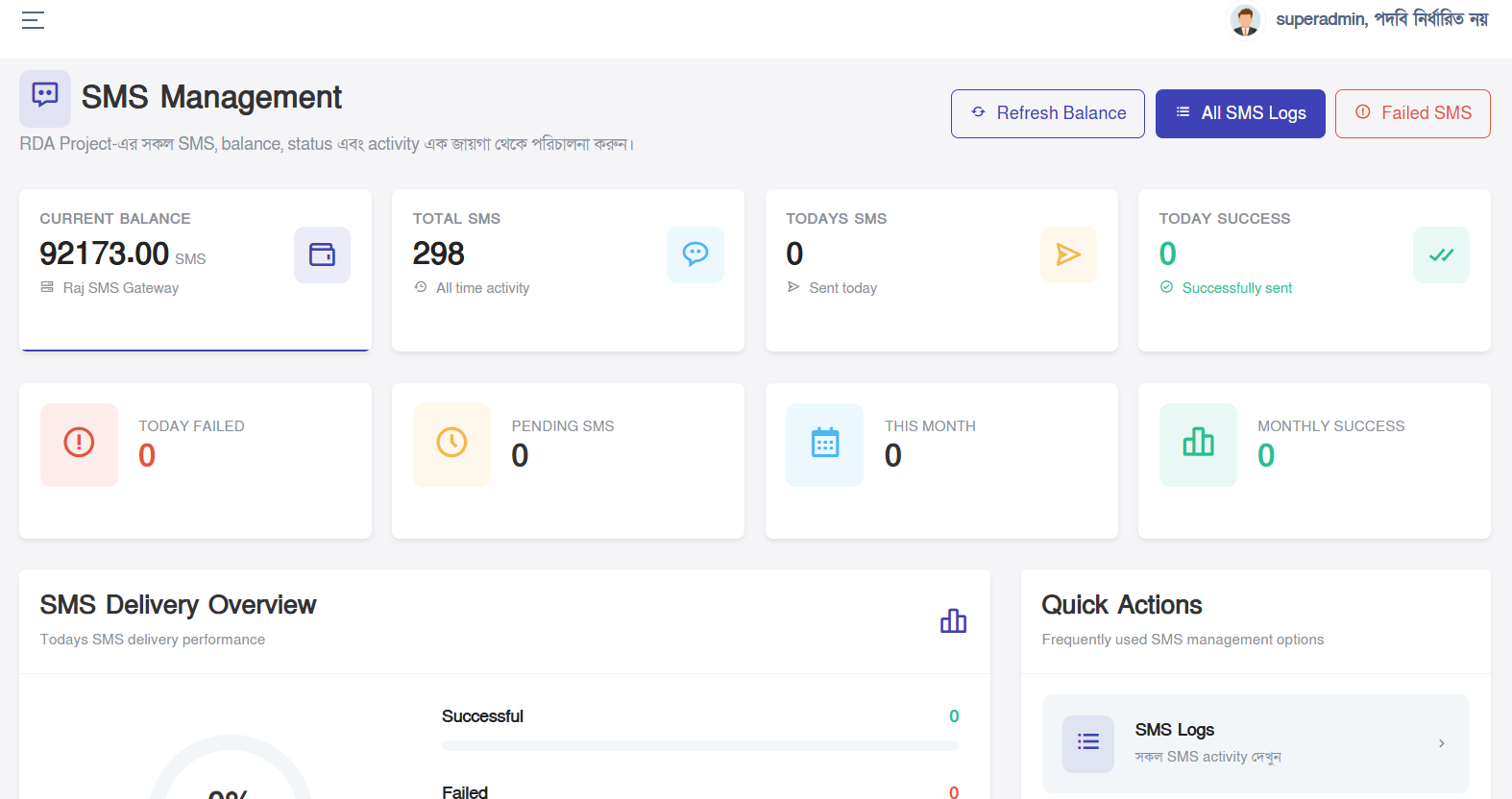
SMS Management Dashboard:
- SMS Balance: Displays the available SMS balance from the configured SMS gateway.
- Total SMS: Shows the overall number of SMS messages processed by the system.
- Successful SMS: Displays the number of SMS messages successfully processed or delivered.
- Failed SMS: Shows SMS messages that failed during the sending process.
- SMS Logs: Provides a detailed history of SMS communication and related activities.
SMS Activity Information:
- Recipient: Mobile number to which the SMS was sent.
- Message: Content of the SMS notification.
- Status: Current processing status of the SMS.
- Gateway: SMS gateway used to process the message.
- Sent At: Date and time when the SMS sending request was processed.
- Response Information: Gateway response or additional information related to the SMS request.
SMS Workflow:
- A system event triggers an SMS notification.
- The system prepares the recipient number and message content.
- The configured SMS gateway processes the SMS request.
- The system records the SMS activity and gateway response.
- The SMS status is updated based on the processing result.
- Administrators can review the activity from the SMS management interface.
ℹ️ The SMS Management System ensures reliable and transparent SMS
communication by providing centralized monitoring, activity tracking,
gateway management, and detailed communication records. It helps
administrators maintain effective communication throughout the RDA system.
SMS Management Dashboard
Complaint Management System
The Complaint Management System provides a centralized platform for
receiving, managing, tracking, and resolving complaints submitted by
applicants and other users. It helps administrators organize complaints
efficiently and ensures that each complaint can be properly monitored
throughout its lifecycle.
The system supports a structured complaint handling process, allowing
administrators to review complaint details, assign appropriate priority,
monitor progress, maintain complaint history, and take necessary actions
until the complaint is resolved or closed.
Key Features:
- Receive and manage complaints submitted by users
- Maintain a centralized complaint database
- Organize complaints by category and priority
- Track complaint status throughout the resolution process
- Assign complaints for appropriate administrative action
- Maintain a complete complaint history
- Manage complaint-related attachments and supporting documents
- Monitor pending, ongoing, resolved, and closed complaints
- Support transparent and accountable complaint handling
Complaint Information:
- Complainant Name: Name of the person submitting the complaint.
- Mobile Number: Contact number provided by the complainant.
- Email Address: Email address provided for communication, when available.
- Complaint Category: Category selected for identifying and organizing the complaint.
- Priority: Indicates the urgency level of the complaint, such as Low, Medium, High, or Urgent.
- Subject: Short title describing the complaint.
- Description: Detailed information provided by the complainant.
- Attachment: Supporting files or documents submitted with the complaint, when applicable.
Complaint Status Management:
- Pending: Complaint has been submitted and is awaiting administrative action.
- In Progress: Complaint is currently being reviewed or processed.
- Resolved: Necessary action has been completed to address the complaint.
- Closed: Complaint handling has been completed and the case has been formally closed.
Complaint Handling Workflow:
- The user submits a complaint through the complaint submission interface.
- The system records the complaint with the submitted information.
- The administrator reviews the complaint details and priority.
- The complaint is processed according to its category and requirements.
- Administrative actions and progress are recorded in the complaint history.
- The complaint status is updated as the case progresses.
- After the necessary action is completed, the complaint can be marked as resolved or closed.
ℹ️ The Complaint Management System provides a structured and transparent
approach to handling public complaints. It enables administrators to
monitor complaints from submission through resolution while maintaining
proper records, accountability, and administrative oversight.
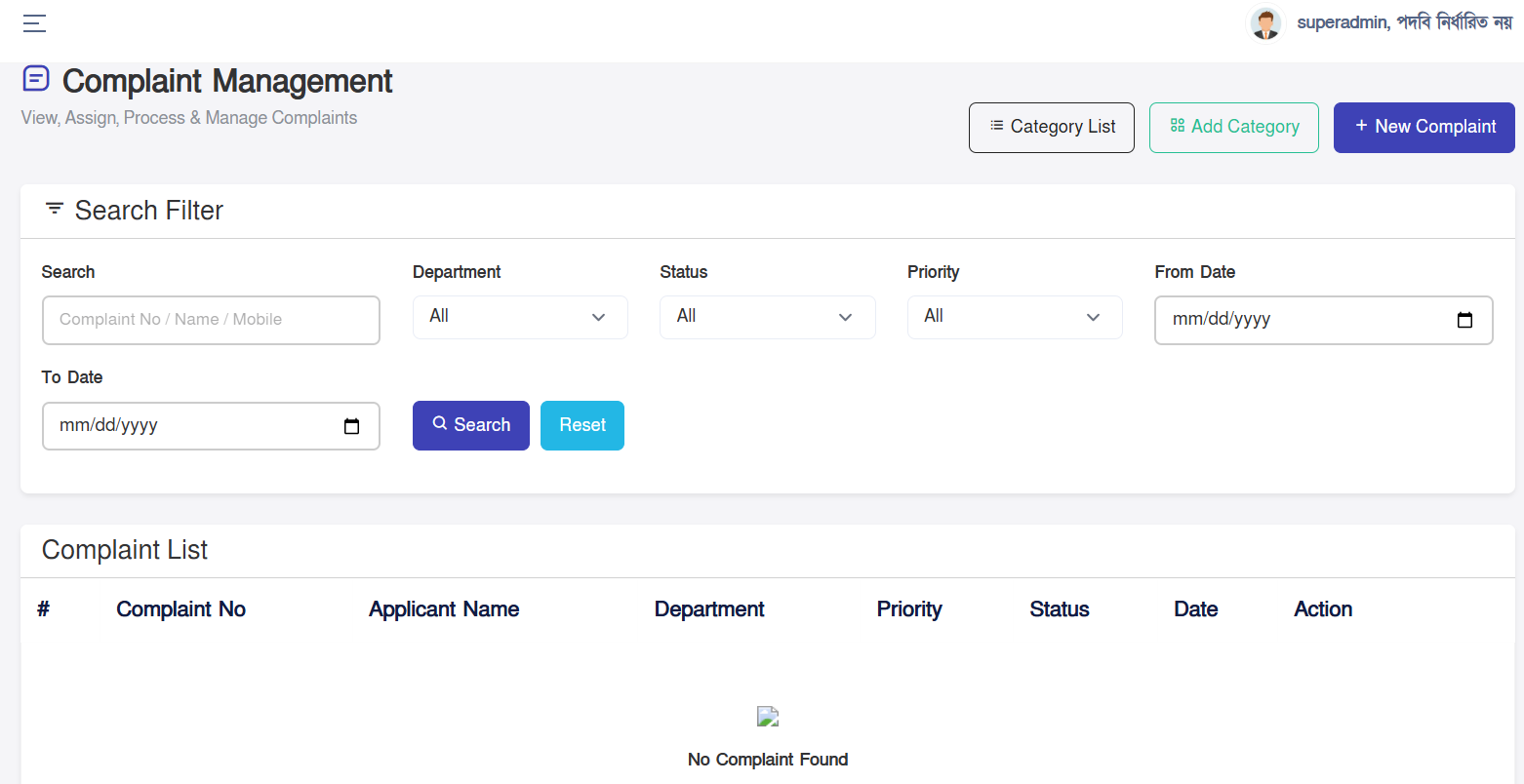
Complaint Management Dashboard
NOC Fee Rules Management
The Fee Rules Management module allows administrators to define and manage
the fee rules used throughout the RDA system. It provides centralized
control over application fees, service charges, and other applicable
charges based on predefined rules and requirements.
This module helps ensure that applicable fees are calculated consistently
and accurately according to the configured rules. Administrators can
manage fee structures and maintain the necessary configurations without
requiring changes to the core application workflow.
Key Features:
- Create and manage fee rules
- Configure applicable application and service fees
- Define fee conditions and calculation criteria
- Maintain different fee structures according to system requirements
- Update existing fee rules when necessary
- Enable or disable applicable fee configurations
- Ensure consistent and automated fee calculation
- Provide centralized administrative control over fee rules
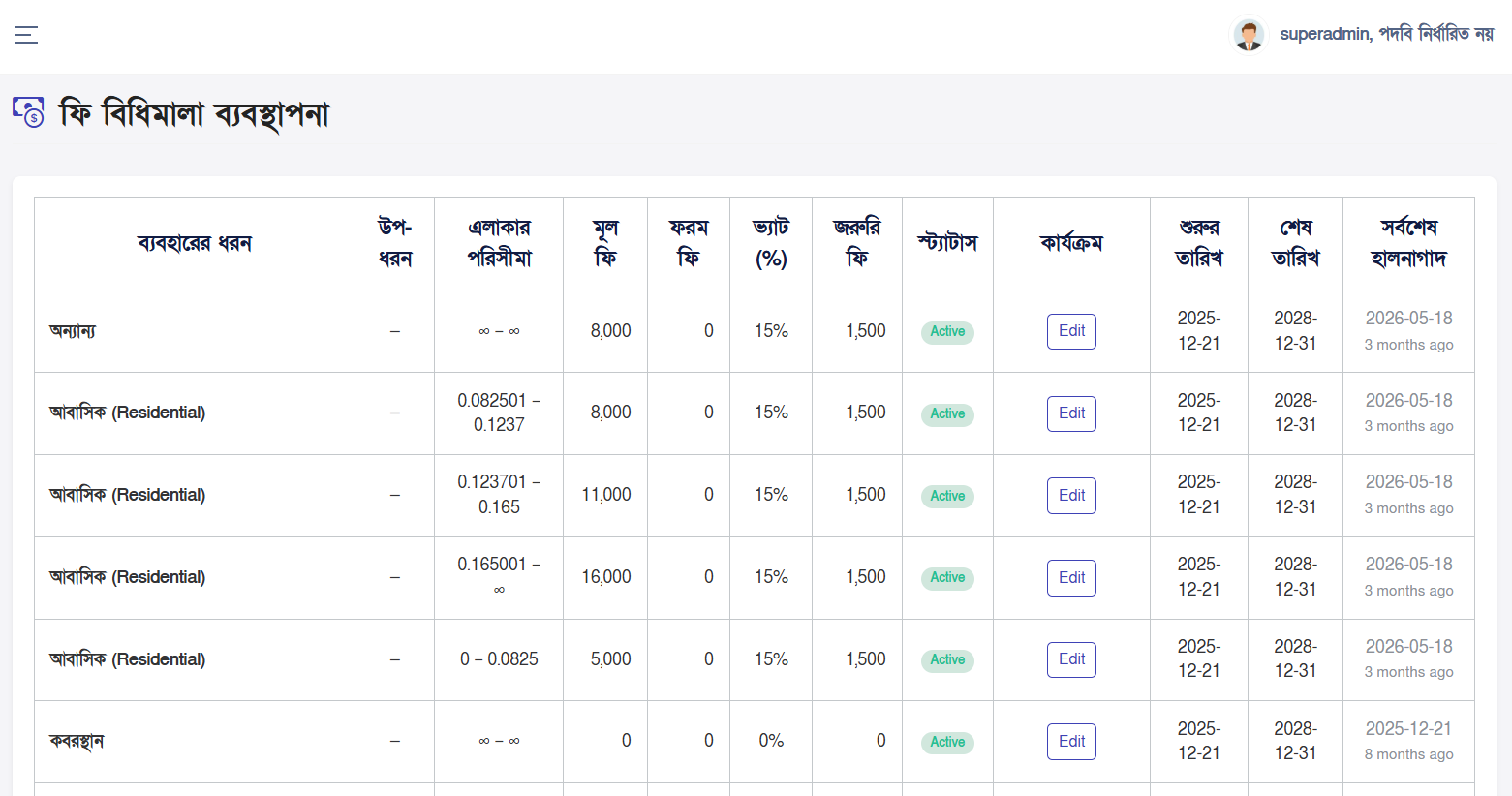
Fee Rule Information:
- Rule Name: Name or identifier of the configured fee rule.
- Fee Type: Type of fee or charge associated with the rule.
- Applicable Condition: Criteria used to determine when the fee rule should be applied.
- Fee Amount: Configured amount or value used for the applicable charge.
- Calculation Method: Method used by the system to determine the applicable fee.
- Status: Indicates whether the fee rule is currently active or inactive.
Fee Rule Management Process:
- Open the Fee Rules Management module from the Admin Panel.
- Review the existing fee rules available in the system.
- Create a new fee rule when a new fee structure is required.
- Configure the required fee conditions and calculation criteria.
- Enter the applicable fee amount or calculation value.
- Save the configuration to make the rule available to the system.
- Update or deactivate a fee rule when necessary.
Administrative Benefits:
- Centralized management of application and service fee rules
- Consistent fee calculation across the system
- Reduced dependency on manual fee calculation
- Easy modification of fee structures when requirements change
- Improved accuracy and transparency in fee management
- Better administrative control over system-wide fee configurations
ℹ️ The Fee Rules Management module provides centralized control over
fee configurations and calculation rules. Properly configured fee rules
help ensure accurate, consistent, and transparent fee calculation
throughout the RDA application workflow.
Fee Rules Management
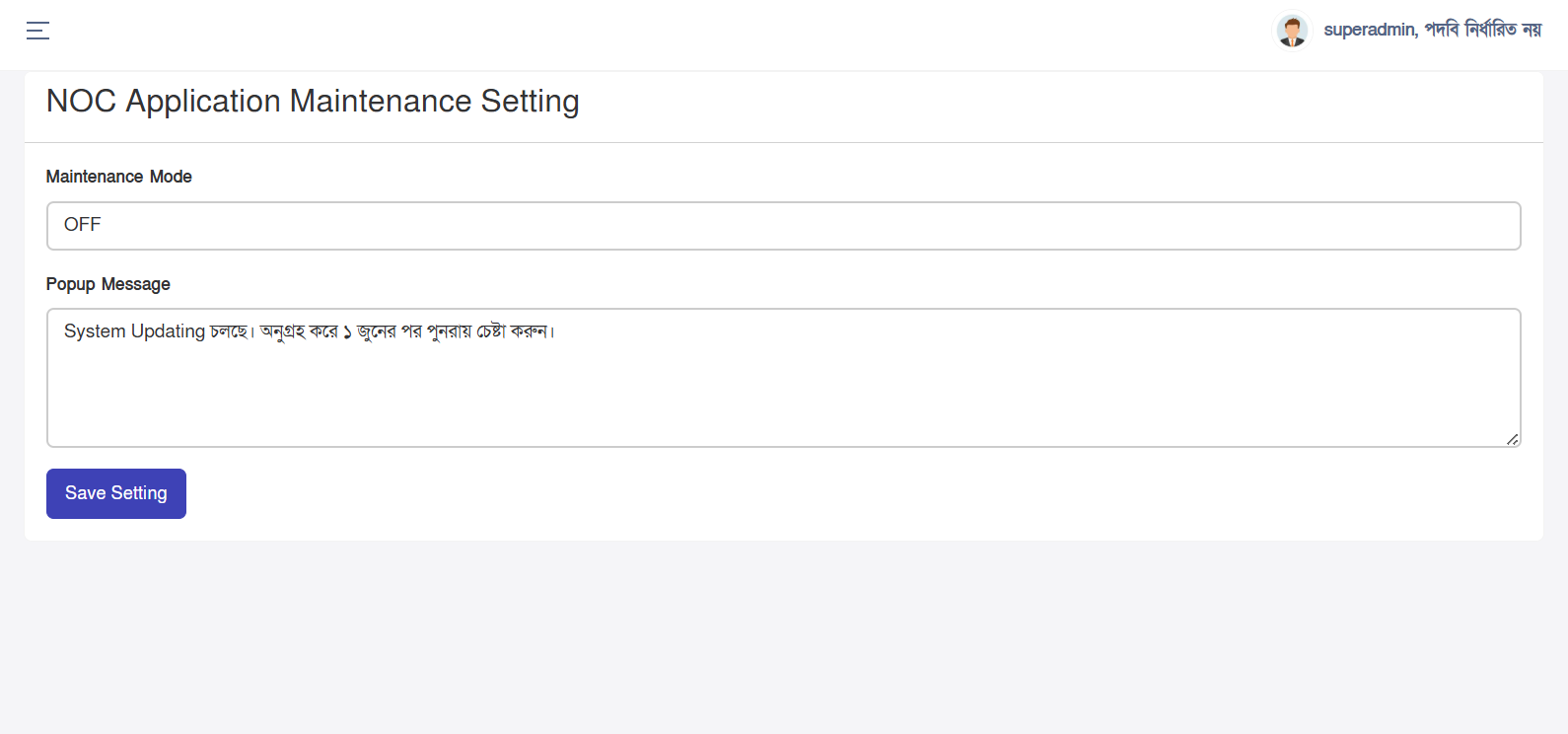
NOC Application Maintenance Settings
The NOC Application Maintenance Settings module allows administrators to
manage and control essential settings related to NOC applications. It
provides centralized control over application availability and operational
behavior.
Key Features:
- Manage NOC application maintenance settings
- Control application availability during maintenance
- Configure maintenance-related system behavior
- Enable or disable maintenance mode when required
ℹ️ These settings help administrators temporarily control NOC application
availability during system maintenance, updates, or other operational
activities.
NOC Application Maintenance Settings